March 9, 2023
Question

Trying to understand local/scoping of variables

  • March 9, 2023
  • 19 replies
  • 0 views

Hi:

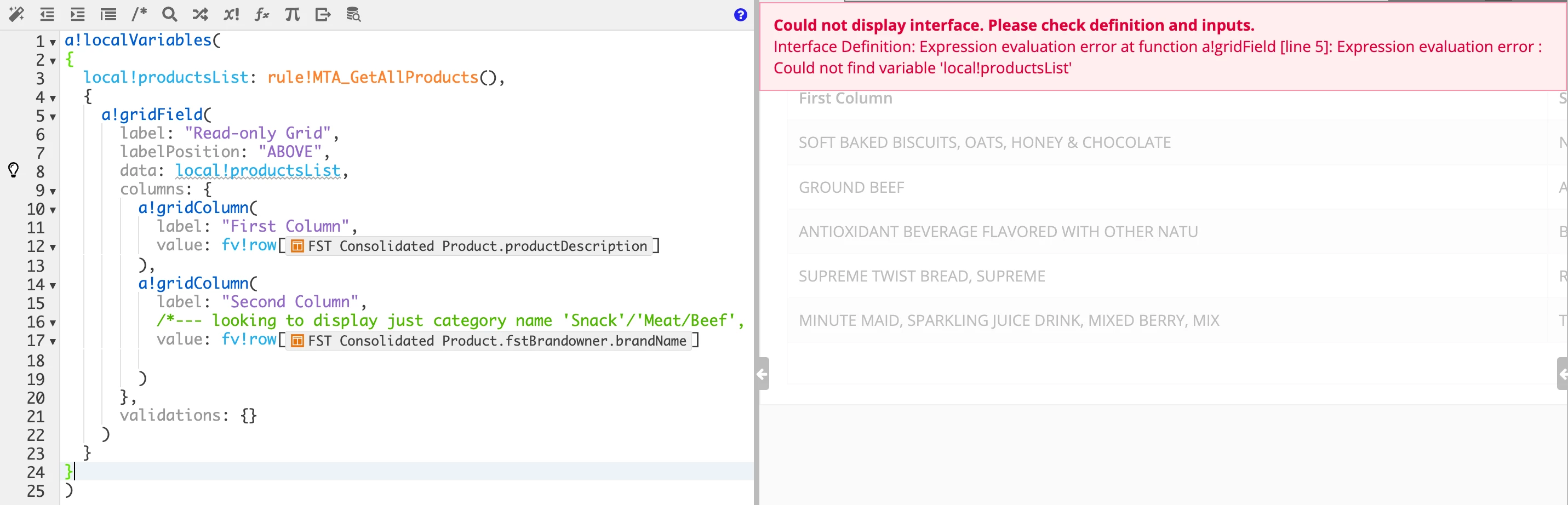
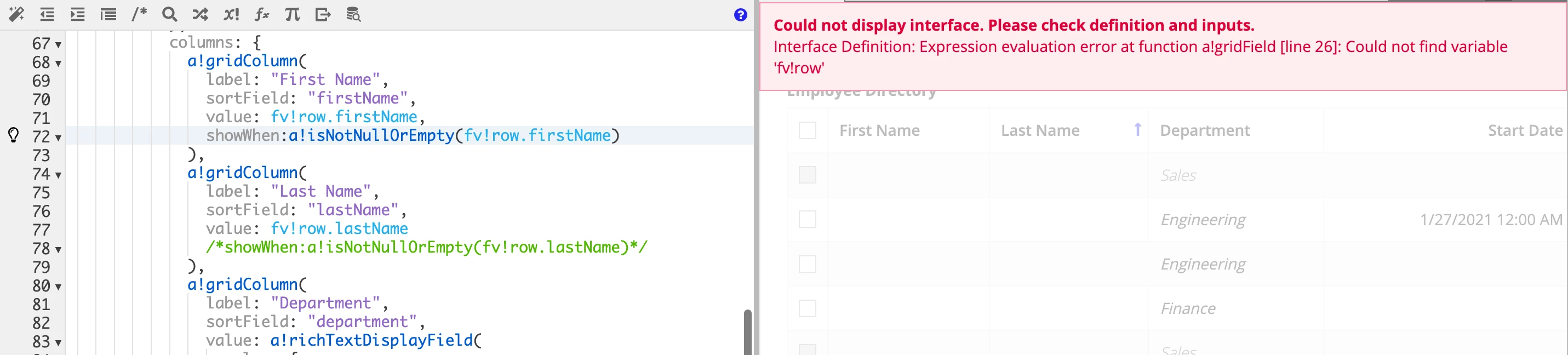
I was experimenting with the Grid example in Appian Tutorials (https://docs.appian.com/suite/help/23.1/Grid_Tutorial.html) and noticed that I had some rows with no firstName and LastName.  So, I thought I would use "fv!row.firstName" as part of the showWhen-attribute to prevent those rows from being show (see image below).  However, I am getting "scoping error" messages.  I know I can use query to filter out those rows but thought I would experiment with this approach because I have had issues with understanding local-variable scoping.  For example, when I use {} right after a!localVariables (), I get scoping error (see second image. 

Any responses to helping me understand local-variables/scoping would be appreciated.

Thank you.

Ma
19 replies

abhayd3663
March 9, 2023

Can you post your code using following instead of the image.

man0001Author
March 9, 2023

Abhay,

Here is the code - emblem

a!localVariables(
  local!selection,
  local!selectedEmployees,
  local!showIneligible:true,
  {
    a!checkboxField(
      label: "Checkboxes",
      labelPosition: "COLLAPSED",
      choiceLabels: {"Show ineligible employees"},
      choiceValues: {true()},
      value: if(local!showIneligible, true(),null()),
      saveInto: a!save(
        local!showIneligible,
        if(
          isnull(save!value),
          false(),
          true()
        )
      ),
      validations: {}
    ),
  a!columnsLayout(
    columns: {
      a!columnLayout(
        contents: {
          a!gridField(
            label: "Employee Directory",
            labelPosition: "ABOVE",
            data: a!queryEntity(
              entity: cons!CR_EMPLOYEE_ENTY_CNST,
              query: a!query(
                selection: a!querySelection(
                  columns: {
                    a!queryColumn(
                      field: "id"
                    ),
                    a!queryColumn(
                      field: "firstName"
                    ),
                    a!queryColumn(
                      field: "lastName"
                    ),
                    a!queryColumn(
                      field: "department"
                    ),
                    a!queryColumn(
                      field: "startDate"
                    )
                  }
                ),
                logicalExpression: a!queryLogicalExpression(
                  operator: "AND",
                  filters: {
                    a!queryFilter(
                      field: "department",
                      operator: "<>",
                      value: "Sales",
                      applyWhen: not(local!showIneligible)
                    )
                  },
                  ignoreFiltersWithEmptyValues: true
                ),
                pagingInfo: fv!pagingInfo
              ),
              fetchTotalCount: true
            ),
            columns: {
              a!gridColumn(
                label: "First Name",
                sortField: "firstName",
                value: fv!row.firstName,
                showWhen:a!isNotNullOrEmpty(fv!row.firstName)
              ),
              a!gridColumn(
                label: "Last Name",
                sortField: "lastName",
                value: fv!row.lastName
                /*showWhen:a!isNotNullOrEmpty(fv!row.lastName)*/
              ),
              a!gridColumn(
                label: "Department",
                sortField: "department",
                value: a!richTextDisplayField(
                  value: {
                    a!richTextItem(
                      text: {fv!row.department},
                      color: if(fv!row.department="Sales","SECONDARY",null),
                      style: {
                        "EMPHASIS"
                      }
                    )
                  }
                )
              ),
              a!gridColumn(
                label: "Start Date",
                sortField: "startDate",
                value: if(
                isnull(fv!row.startDate),
                fv!row.startDate,
                datetext(fv!row.startDate, "default")
                ),
                align: "END"
              ),
              a!gridColumn(
                label: "Id",
                sortField: "id",
                value: fv!row.id,
                align: "END"
              )
            },
            initialSorts: {
              a!sortInfo(
                field: "lastName",
                ascending: true
              )
            },
            selectable: true,
            selectionValue: local!selection,
            selectionSaveInto: {
              local!selection,

              /* This save adds the full rows of data for items selected in the most recent user interaction to local!selectedEmployees. */
              a!save(local!selectedEmployees, append(local!selectedEmployees,fv!selectedRows)),
              /* This save removes the full rows of data for items deselected in the most recent user interaction to local!selectedEmployees */
              a!save(local!selectedEmployees, difference(local!selectedEmployees,fv!deselectedRows))
            },
            disableRowSelectionWhen: fv!row.department="Sales",
            validations: {}
          )
        },
        width: "WIDE"
      ),
      a!columnLayout(
        contents: {
          a!richTextDisplayField(
            label: "Selected Employees",
            labelPosition: "ABOVE",
            value: a!forEach(
              items:local!selectedEmployees,
              expression: {
                a!richTextIcon(
                  icon:"user-circle"
                ),
                " " & fv!item.firstName & " " & fv!item.lastName & char(10)
              }
            )
          )
        }
      )
    }
  )
}
)

abhayd3663
March 9, 2023

looks like fv!raw can only be used in the value parameter. Remove it from showWhen:a!isNotNullOrEmpty(fv!row.firstName)

Instead do following.

1. Define local variable (e.g. local!data) and capture the query result set into it.

2. Refer local!data into gridField -> data.

3. For showWhen condition Use local!data.firstName = <something>

abhayd3663
March 9, 2023

It's simple. The variable is accessible within the block into which it is defined.

See the following to understand it better -

a!localVariables(
  local!a: 1,
  {
    a!localVariables(local!b: 2, local!a),
    local!b
  }
)

man0001Author
March 9, 2023

Abhay,

That was understanding - variable is available within the defined block.  Unless, I am missing something, I don't see why line 8 in my example (second image in my original post) gives an error when the variable is defined on line 3.  However, if I remove the braces on line 2 and 24, the error goes away (see image below).

Madhu

abhayd3663
March 9, 2023

Please try to understand the syntax of a!localVariables().

a!localVariableslocalVar1, localVarN, expression )

In your image2, you have defined local!productsList without using localVariable() which is violating the syntax because it is the expression portion.

use something like following.

a!localVariables(
  {
    a!localVariables(
      local!productList: rule!abc(),
      a!gridField()
    )
  }
)

See the color coding to understand it better.