
spoorthyn0001
July 13, 2021
Solved

Update Document Metadata - SharePoint returned a 404 HTTP error

  • July 13, 2021
  • 7 replies
  • 0 views

Hi ,

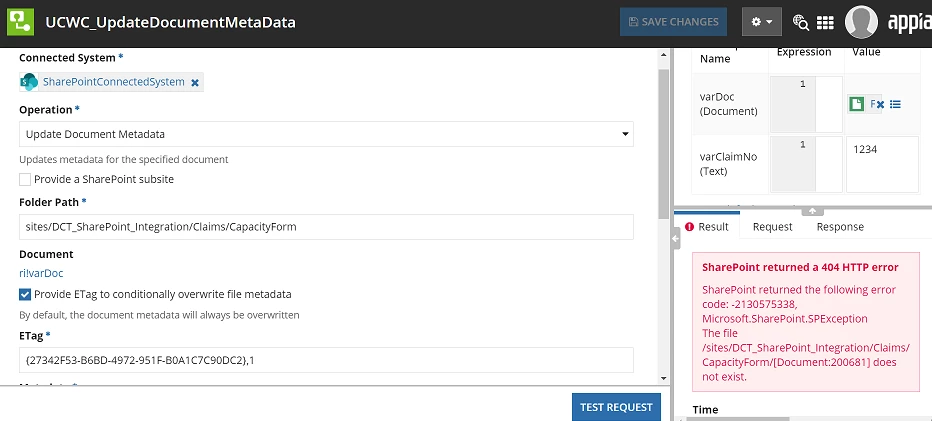
I am Using "Update Document Metadata Operation" to Updates metadata for the specified document. But facing below error.

SharePoint returned a 404 HTTP error

error-result-guidance

SharePoint returned the following error code: -2130575338, Microsoft.SharePoint.SPException The file /sites/DCT_SharePoint_Integration/Claims/CapacityForm/[Document:200681] does not exist."

PFB Screeshot. Please suggest the solution to the issue
Thanks

    Best answer by stefanhelzle0001

    https://docs.appian.com/suite/help/21.2/fnc_scripting_document.html

    todocument() is used to convert the internal ID of a document from numeric or string into a document type. You rule input already is of type document.

    document(ri!varDoc, "name") & "." & document(ri!varDoc, "extension")

    7 replies

    stefanhelzle0001
    Brainy
    July 13, 2021

    At the end of the URL you see "[Document:200681]" this is Appian default behavior for turning a document into a string. You will probably want to change this using the function document().

    spoorthyn0001
    July 13, 2021

    Tried this. But still the same error [mention:126a676c85024855948336691b0a7b92:e9ed411860ed4f2ba0265705b8793d05]

    stefanhelzle0001
    Brainy
    July 13, 2021

    Tried what?

    I do not know how SharePoint references a document. If its is "<name>.<extension>" then you can create that using the document() function.