

Using grid for a survey interface
Hi team
I'm needing some help with getting an interface together to populate a simple table for collecting survey data.
I have a list of software titles divided into categories.
Each category will be surveyed individually, until we have gone through the entire list of titles - this is to avoid providing our users with a massive task!
Likewise I do not want to send through a task for each individual title in a category.
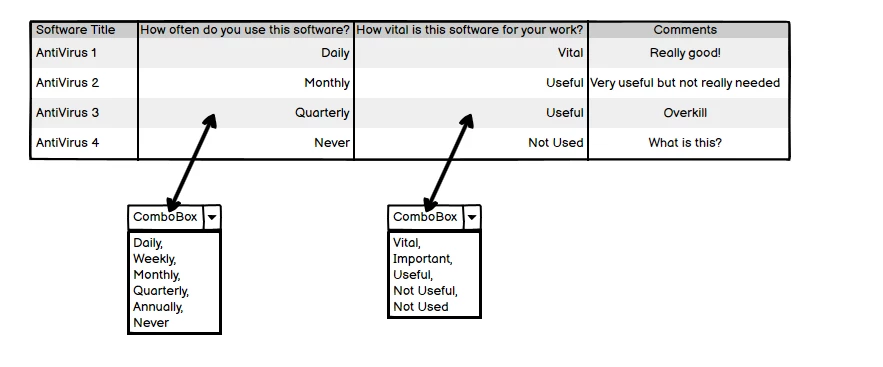
Here is the concept model for what I want to do:
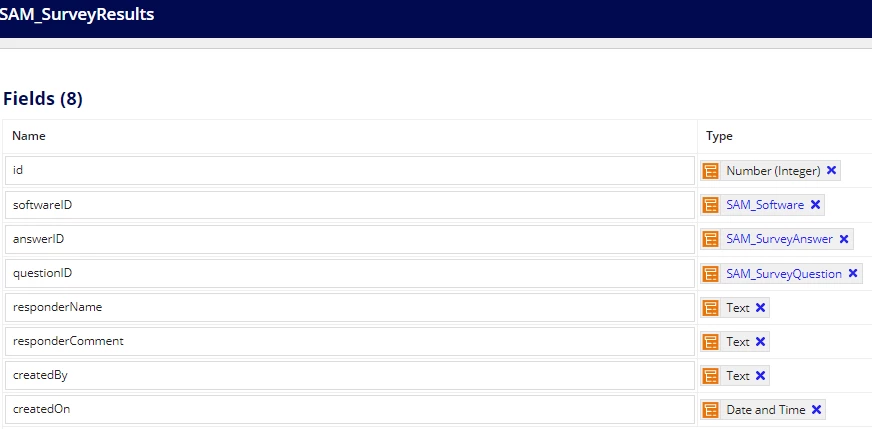
The survey result CDT looks like this:
I have been thrashing around for the past few days with Editable Grids and Read Only Grids, and am experiencing the following issues:
- With an editable grid I can put a dropdown into the column but I do not know how to generate an individual row for each title.
- With a read-only grid I can get the individual row for each title but I do not know how o set up the dropdown or equivalent for my users to be able to choose their response
I have tried various approaches and am now finding myself running around in circles.
For a starting point I need a firm recommendation on which interface will meet my needs best. Following on from there I will be able to troubleshoot where needed.
Thanks and blessings
Stephen
