

steffena0001
January 14, 2022
Solved

Validation of a constant in Dropdown

  • January 14, 2022
  • 4 replies
  • 0 views

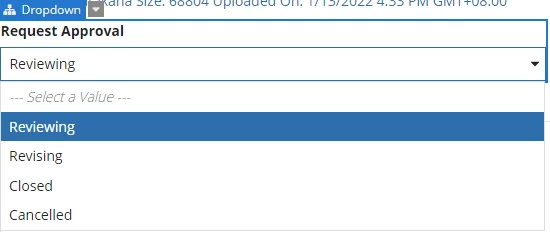
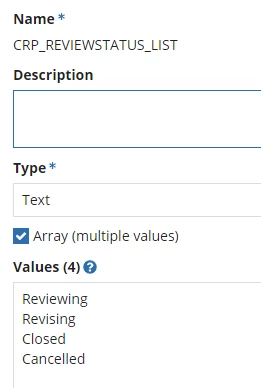
I have a dropdown in which the values are called from a constant. Will it be possible to customize which items will only come out?

Let's say the status of the request is cancelled, then I should only cancelled in the dropdown. Then if the status is reviewing, I should only see reviewing and revising. etc

Dropdown:
Constant:
Code for Reference:

a!dropdownField(
label: "Request Approval",
labelPosition: "ABOVE",
placeholder: "--- Select a Value ---",
choiceLabels: cons!CRP_REVIEWSTATUS_LIST,
choiceValues: cons!CRP_REVIEWSTATUS_LIST,
value: ri!review.reviewStatus,
saveInto: ri!review.reviewStatus,
searchDisplay: "AUTO",
required: false,
validations: {}
)

Best answer by stefanhelzle0001

Got it.

Our approach to status value is, that we have an individual constant for each value. Then we can reference each value clearly and also use it for comparisons.

To get a list of all values, we then create an expression which returns a list of all the constants.

In a task form, you could then just list the values you need for that form.

And if you use a reusable component, you could create a local holding the values matching the current status. A decision table can do that as well.

4 replies

stefanhelzle0001
Brainy
January 14, 2022

Wouldn't it be easier to use a textField in readonly to display that value? This is what I am doing. DropDown for modification and a textField for display. Of course, you can also use a richTextField etc.

steffena0001
January 14, 2022

I think I worded it wrongly. What I'm trying to say is the dropdown should differ depending on the status.

Example, if status is currently closed, then I should only see closed and cancelled.

Or if the status is open, then I should only see revising and reviewing on the dropdown. 

stefanhelzle0001
Brainy
January 14, 2022

Got it.

Our approach to status value is, that we have an individual constant for each value. Then we can reference each value clearly and also use it for comparisons.

To get a list of all values, we then create an expression which returns a list of all the constants.

In a task form, you could then just list the values you need for that form.

And if you use a reusable component, you could create a local holding the values matching the current status. A decision table can do that as well.