December 23, 2021
Solved

why a!fileuploadfield can upload file at Interface but can't on site?

  • December 23, 2021
  • 9 replies
  • 0 views

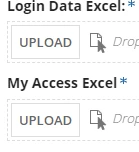
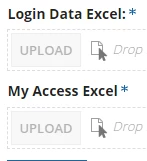
As title the top one is interface without problem, bottom one as published on the site upload is not clickable, why? Thank you
    Best answer by vaisakhv4138

    Please follow the below steps:

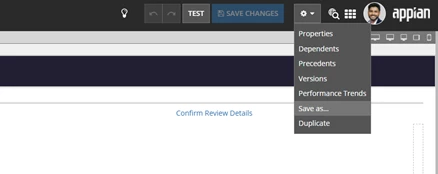
    1. Open your interface and select "Save as" option as below:

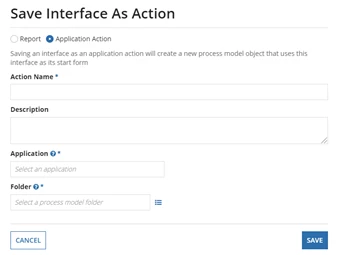
    2. Select "Application Action" 

    9 replies

    mikes0011
    Brainy
    December 23, 2021

    Per the Documentation, this is expected behavior:

    The Expression Guru
    December 24, 2021

    Is this mean upload function only allow in the processmodel?

    mikes0011
    Brainy
    December 24, 2021

    Yes, it has to be on either a start form or user input task in the context of a process model. 

    In particular, this is because any file you upload to the upload box is kept in a hidden temporary location in the Appian filesystem and not moved to its target folder until the form is submitted, again in the context of a process model.  Thus even if you were able to enable one on a Site, it would never actually work, in terms of uploading your file where you want it to go.  When you're looking at an interface in the Interface Designer, however, the functionality is slightly less locked-down just so it's more testable for designers.

    The Expression Guru