
November 22, 2023
Solved

Why is "employeeID" NULL when i save it?

  • November 22, 2023
  • 6 replies
  • 0 views

Hello guys, i have an issue when saving data into the record type. 

In my application i have following record types: 

1. Record Type "Employees" which contains "employeeID","firstName","lastName","email", ...

I have a interface where i can add this data, i created a process model that saves this data and it creates a basic user in appian based on this data

2. Record Type "Vacation Requests" which contains "requestID","employeeID","startDate","endDate","approved"

In my process model "Create Vacation Request", i added a script task which should store "employeeID" into "Vacation Requests" record type. 

I created an expression rule "EAA_GetCurrentUserID" whish contains: 
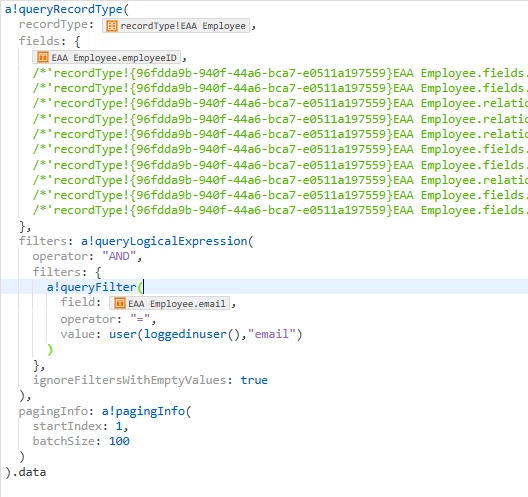
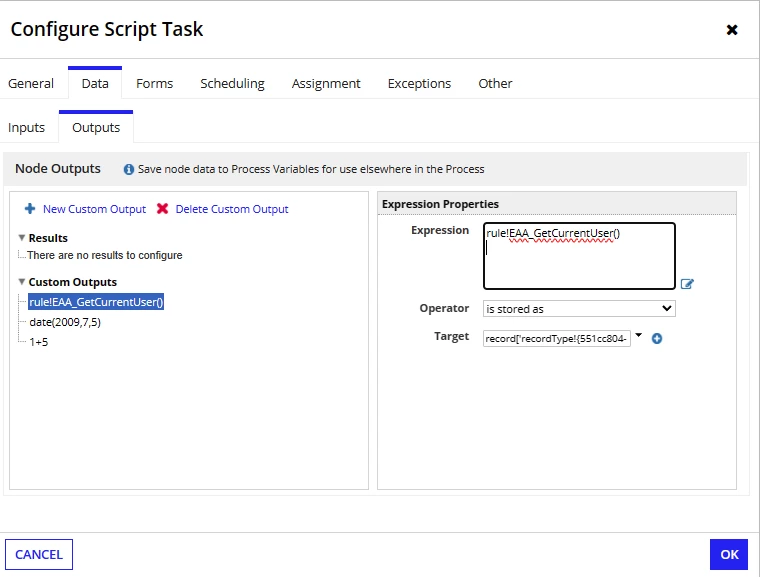
I use this query in my script task's Output tab to store logged in user's ID into my process variable and then store it in "employeeID" in my "Vacation Requests" record type.

Query returns current user's ID, so that works fine, but it is NULL when i try to save it into a record type. 

I was wondering if anyone has any ideas why this is happening, or if there is another better way to do this. 

Script Task:
Thanks for reading!

    Best answer by konduruc733182

    Could you please change the type of list to a single integer value or add the index in your expression in the  PM Script and try. Also I would recommend using the update function to pass your individual PV values into the record data. 

    6 replies

    November 22, 2023

    Hi Karlon,

    Is your vacation request multiple? if Yes, repeat that value. using repeat function

    November 22, 2023

    If your record type PV is of type multiple then we will face error message when we are trying to store any data into specific field of record type PV (looks like there is some issue ) 

    to resolve this you can either user a!update function to update specific field or you can perform null check for the Pv ,if there is value in the pv then try to map the value to the field if not skip the mapping

    konduruc733182
    November 22, 2023

    Hello karlon2336,

    Could you please show the output of your expression rule where you are getting the ID.

    November 22, 2023

    konduruc733182
    November 22, 2023

    Could you please change the type of list to a single integer value or add the index in your expression in the  PM Script and try. Also I would recommend using the update function to pass your individual PV values into the record data.