April 5, 2023
Solved

Why is this so difficult to do (record set listing)?

  • April 5, 2023
  • 12 replies
  • 0 views

Why is it so hard to create something like this in Appian?

Filed 1 Field 2
Checkbox Field1Value Field2Value

3/6 records selected

I can get the check boxes and the Field 1 and Field 2 in a table as well as the selected count.

What I can't seem to get the total record count.

Best answer by amans0009

if you are looking for this ->
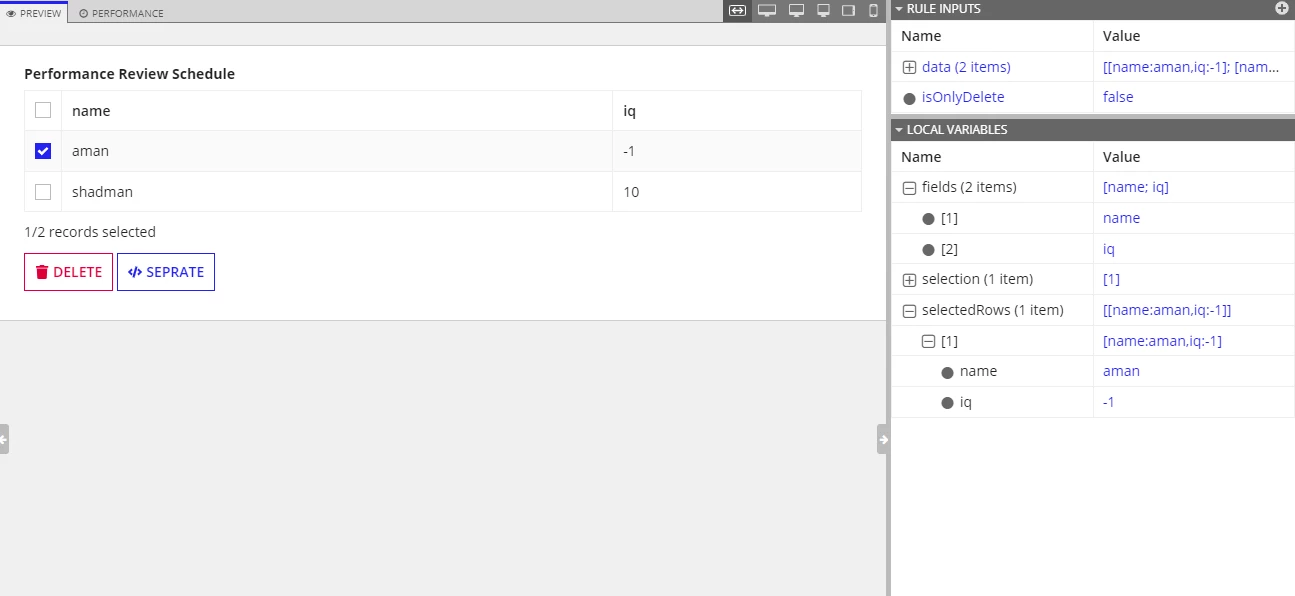
a!localVariables(
  /*/make sure ri!data is notnull*/
  local!fields: a!keys(index(ri!data, 1, "")),
  local!selection,
  local!selectedRows,
  {
    a!gridField(
      label: "Performance Review Schedule",
      labelPosition: "ABOVE",
      data: ri!data,
      columns: {
        a!forEach(
          items: local!fields,
          expression: a!gridColumn(
            label: fv!item,
            value: index(fv!row, fv!item, "")
          )
        )
      },
      pagesize: 10,
      selectable: true,
      selectionValue: local!selection,
      selectionSaveInto: {
        local!selection,
        a!save(
          local!selectedRows,
          append(local!selectedRows, fv!selectedRows)
        ),
        a!save(
          local!selectedRows,
          difference(local!selectedRows, fv!deselectedRows)
        )
      }
    ),
    a!richTextDisplayField(
      labelPosition: "COLLAPSED",
      value: {
        a!richTextItem(
          text: if(
            a!isNullOrEmpty(local!selectedRows),
            "0/" & length(ri!data) & " records selected",
            length(local!selectedRows) & "/" & length(ri!data) & " records selected"
          )
        )
      }
    ),
    a!buttonArrayLayout(
      buttons: {
        a!buttonWidget(
          label: "Delete",
          icon: "trash-solid",
          style: "DESTRUCTIVE",
          disabled: a!isNullOrEmpty(local!selectedRows)/*saveInto: here is logic for delete*/
          
        ),
        a!buttonWidget(
          label: "seprate",
          icon: "code",
          style: "NORMAL",
          /*saveInto: here is logic for seprate*/
          showWhen: not(or(ri!isOnlyDelete)),
          disabled: a!isNullOrEmpty(local!selectedRows)
        )
      },
      align: "START"
    )
  }
)

12 replies

April 5, 2023

Can you explain it in more detail? I can't get what you are up to.

harshitb6843
April 6, 2023

Creating something like this on the interface level is pretty simple but I am sure you have a bigger purpose. Provide some more supporting information. 

petel0001Author
April 6, 2023

To add more context.
Working on five different applications.
Each application uses a STAR schema and in the 'Admin' the related tables need CRUD interfaces and process models.
The interface in the current setup with a different LowCode platform has this type of interface.

Plus, there are some areas which are not in the Admin which have a record listing of related child records, which have the interface for doing things like Deleting Selected Records, Merging Selected Records, etc.

The client explicitly stated that they NEED to have the "X/Y records" selected.

-----------------------------------
@Harshit Bumb
I take issue with someone saying that creating this "is pretty simple".
It may be easy for someone who has used and/or programmed in Appian for more than a few months.
For instance a heart surgeon may say that doing a by-pass "is pretty simple", but you don't want me to do that operation, even though it "is pretty simple".

stefanhelzle0001
Brainy
April 6, 2023

Hm... I do not feel that I fully understand about what we are talking here.

In general, GRUD can easily be auto-generated using Records and related actions and views.

Can you go a bit deeper into your goals and design?