
Question
Why two key stork is required to select one value from dropdown component?
Below is the code in which when we want to select option "Four" then we have to press "F" twice.
a!localVariables(
  local!options : {"One","Two","Three","Four","Five"},
  local!selectedValue,
  {
    a!dropdownField(
      label: "Dropdown",
      labelPosition: "ABOVE",
      placeholder: "--- Select a Value ---",
      choiceLabels: local!options,
      choiceValues: local!options,
      value:local!selectedValue,
      saveInto: local!selectedValue,
      searchDisplay: "OFF",
      validations: {}
    )
  }
)
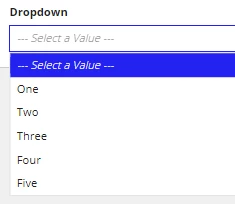
When we press "F" first time the options opens.
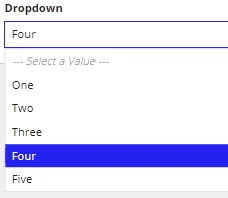
And when we press "F" second time only then the value "Four" is selected.
However, it was not the same behavior in previous versions.
Can you help me achieve the same functionality/behavior with version 22.4 ?