
Docx From Dynamic Template
Hi All,
I'm trying to generate table in docx Using Docx From Dynamic Template. When trying with sample data and template as given below
"<info>
<rowvalues name = 'John Samuael' branch= 'CSE' rollNum= 'abc' />
<rowvalues name = 'Michelle Dsouza' branch= 'IT' rollNum= 'fgh' />
</info>"
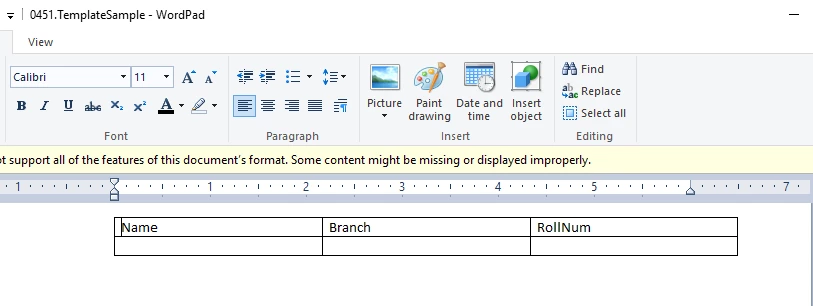 Here its working fine and able to generate 2 row of data
But when I'm trying to generate with actual data i.e as given below
<info>
<rowvalues name = 'Gaurav' dob= '4/1/2021' requestnumber= '1' />
<rowvalues name = 'Gaurav Singh' dob= '4/1/2021' requestnumber= '2' />
<rowvalues name = 'Shahid' dob= '4/2/2021' requestnumber= '1' />
<rowvalues name = 'Shahid Salman' dob= '4/2/2021' requestnumber= '2' />
<rowvalues name = 'Prachu' dob= '4/3/2021' requestnumber= '2' />
</info>"
And using template as 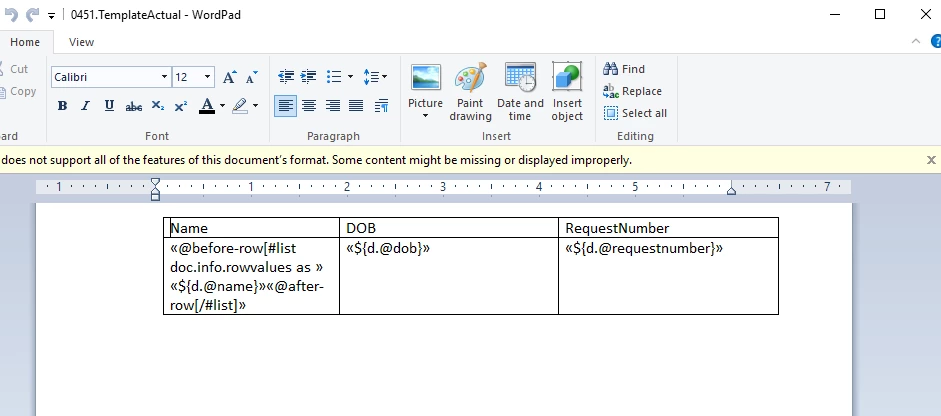
No data is getting populated in the grid.
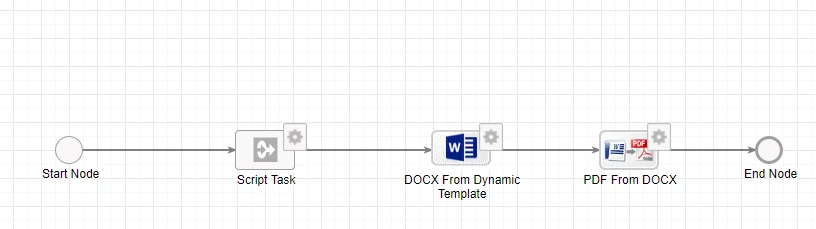 I'm preparing the xml in an Expression rule, calling the rule in script task and storing the value in a text field then Passing it to the "XML Data Model"
attribute of Smart service.
Kindly let me know if something is missing.