
January 28, 2021
Question

Network-graph-component Plugin query

  • January 28, 2021
  • 3 replies
  • 1 view

Hi ,

I have used fraud ring network graph plugin for one scenario as below,
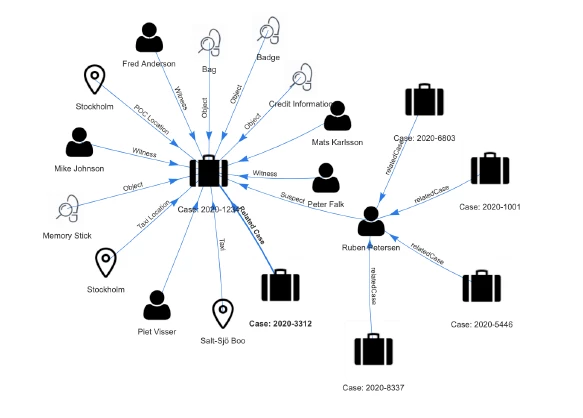
Q1. Can we get the dynamic data from external DB's and build network diagram? How to map the nodes and edges respectively for dynamic values?

Q2. I have a requirement, to show the drill-down level of each node as a separate interface. Is it possible to implement the same by using Network-graph-component Plugin?

Q3. Can we show/hide the nodes depends on the requirements? Any examples please share.

Any reference links and example implementation would be appreciated. 

3 replies

pedro.simoes
January 28, 2021

Hi [mention:fd4fcb025e81470a9e1bf8fa98469e31:e9ed411860ed4f2ba0265705b8793d05],

I suggest you post this question in the specific plugin page so that the plugin creators can help you.

January 29, 2021

Thanks pedro.simoes. Posted the same query,

dastagirid0003
February 9, 2021

Q1. Can we get the dynamic data from external DB's and build network diagram? How to map the nodes and edges respectively for dynamic values?

Ans: Yes. When we have accurate node details and their corresponding details in DB tables, 

  1. Get the node details and its edge details from DB or view (incase of separate tables for nodes and edges)
  2. Create separate expressions. One for formulating dictionary of nodes and another for formulating dictionary of edges
  3. Pass them to the networkGraphField

Please find the code snippet at the bottom.

{
  a!localVariables(
//Use the expression for preparing the dictionary of nodes in case of database retrieval
    local!nodes:{
      {id: 1,label: "Node 1", hidden: false},
      {id: 2,label: "Node 2", hidden: false},
      {id: 3,label: "Node 3", hidden: false},
      {id: 4,label: "Node 4", hidden: false},
      {id: 5,label: "Node 5", hidden: false},
      {id: 6,label: "Node 6", hidden: false}
    },
//Use the expression for preparing the dictionary of edges in case of database retrieval
    local!edges:{
      { from: 1, to: 2 },
      { from: 1, to: 3 },
      { from: 1, to: 4 },
      { from: 4, to: 5 },
      { from: 4, to: 6 }
    },
  networkGraphField(
    label: "Network Graph Field",
    labelPosition: "ABOVE",
    validations: {},
    height: "SHORT",
    nodes: local!nodes,
    edges: local!edges,
    nodeOptions: {},
    edgeOptions: {
      arrows: "to"
    },
    groups: {},
    layout: {
      hierarchical: {
        direction: "UD",
        sortMethod: "directed"
      }
    },
    interaction: {},
    physics: {
      barnesHut: {
        springLength: 200
      }
    },
    showBorder: true
  )
  )
}

Q2. I have a requirement, to show the drill-down level of each node as a separate interface. Is it possible to implement the same by using Network-graph-component Plugin?

Ans: No. The existing networkGraphField component does not have link facility. If we need we need to customize the component to enable the link facility.

Q3. Can we show/hide the nodes depends on the requirements? Any examples please share.

Ans: Yes. We can hide the nodes by using the hidden parameter of the Node. Following code snippet demonstrate this requirement.

Note: When we hide node, the node will be disappeared. Its associated edges will be removed from it connected nodes.

â`¦

nodes: {{id: 1, label: "Node 1", hidden:true }}

â`¦

Image with fully connected nodes.

{
  a!localVariables(
    /*Use the expression for preparing the dictionary of nodes in case of database retrieval*/
    local!nodes:{
      {id: 1,label: "Node 1", hidden: false},
      {id: 2,label: "Node 2", hidden: false},
      {id: 3,label: "Node 3", hidden: false},
      {id: 4,label: "Node 4", hidden: false},
      {id: 5,label: "Node 5", hidden: false},
      {id: 6,label: "Node 6", hidden: false}
    },
    /*Use the expression for preparing the dictionary of edges in case of database retrieval*/
    local!edges:{
      { from: 1, to: 2 },
      { from: 1, to: 3 },
      { from: 1, to: 4 },
      { from: 4, to: 5 },
      { from: 4, to: 6 }
    },
    networkGraphField(
      label: "Network Graph Field",
      labelPosition: "ABOVE",
      validations: {},
      height: "SHORT",
      nodes: local!nodes,
      edges: local!edges,
      nodeOptions: {},
      edgeOptions: {
        arrows: "to"
      },
      groups: {},
      layout: {
        hierarchical: {
          direction: "UD",
          sortMethod: "directed"
        }
      },
      interaction: {},
      physics: {
        barnesHut: {
          springLength: 200
        }
      },
      showBorder: true
    )
  )
}

Image with Node 4 hidden

{
  a!localVariables(
    /*Use the expression for preparing the dictionary of nodes in case of database retrieval*/
    local!nodes:{
      {id: 1,label: "Node 1", hidden: false},
      {id: 2,label: "Node 2", hidden: false},
      {id: 3,label: "Node 3", hidden: false},
      {id: 4,label: "Node 4", hidden: true},
      {id: 5,label: "Node 5", hidden: false},
      {id: 6,label: "Node 6", hidden: false}
    },
    /*Use the expression for preparing the dictionary of edges in case of database retrieval*/
    local!edges:{
      { from: 1, to: 2 },
      { from: 1, to: 3 },
      { from: 1, to: 4 },
      { from: 4, to: 5 },
      { from: 4, to: 6 }
    },
    networkGraphField(
      label: "Network Graph Field",
      labelPosition: "ABOVE",
      validations: {},
      height: "SHORT",
      nodes: local!nodes,
      edges: local!edges,
      nodeOptions: {},
      edgeOptions: {
        arrows: "to"
      },
      groups: {},
      layout: {
        hierarchical: {
          direction: "UD",
          sortMethod: "directed"
        }
      },
      interaction: {},
      physics: {
        barnesHut: {
          springLength: 200
        }
      },
      showBorder: true
    )
  )
}