

anusuyak349977
July 31, 2025
Question

ReadExcelByHeaders

  • July 31, 2025
  • 7 replies
  • 0 views

Hi everyone [emoticon:c4563cd7d5574777a71c318021cbbcc8],

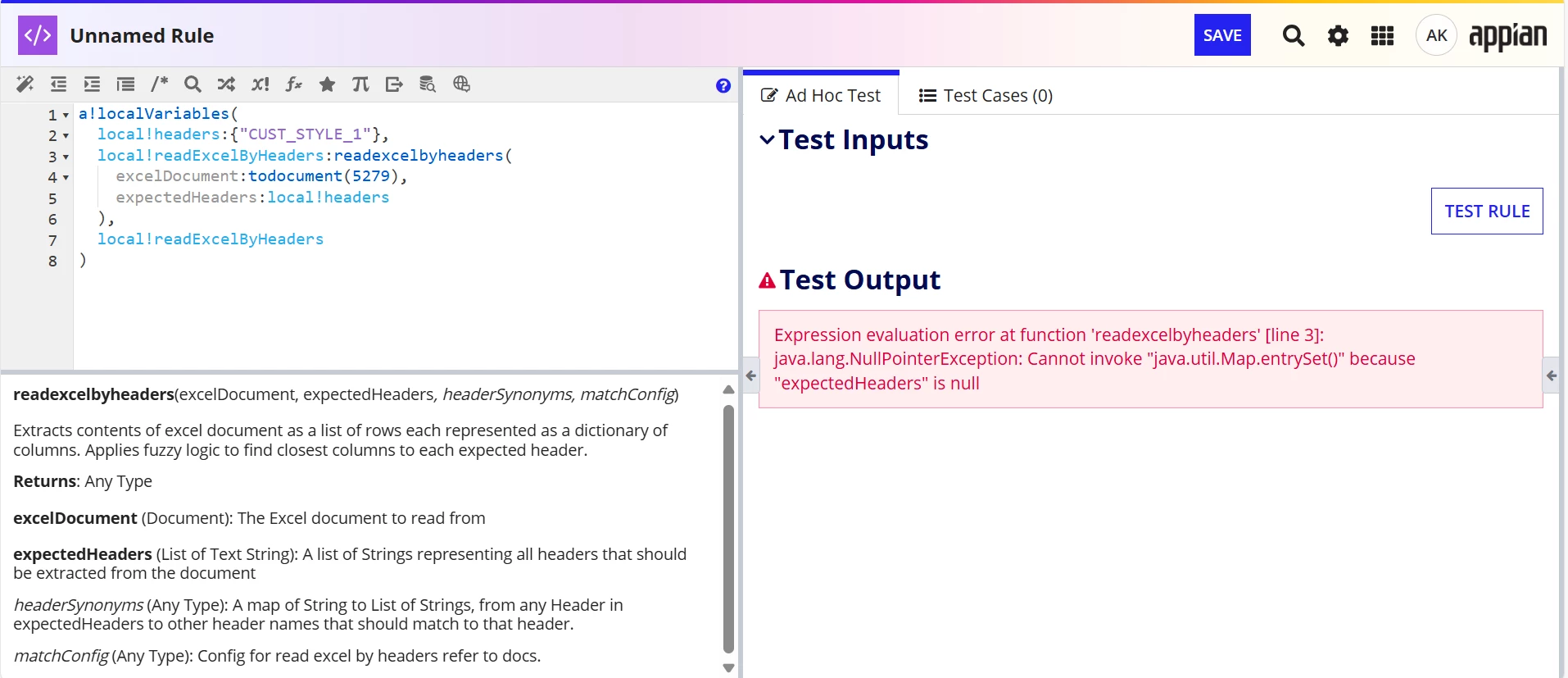
I have a scenario to use ReadExcelByHeaders. 

But it is throwing me an error:
Expression evaluation error at function 'readexcelbyheaders' [line 3]: java.lang.NullPointerException: Cannot invoke "java.util.Map.entrySet()" because "expectedHeaders" is null
    7 replies

    anusuyak349977
    July 31, 2025

    If Synonyms is passed, this is working fine.

    July 31, 2025

    Hi [mention:f5e1c63738d74f0097f6242f0d782ca7:e9ed411860ed4f2ba0265705b8793d05] 

    Try this logic. It may help you.

    a!localVariables(
      local!synonyms: { "CUST_STYLE_1": { "CUST_STYLE_1" } },
      local!matchConfig: {
        includeUnmatchedColumns: true,
        fuzzyBoost: true
      },
      local!data: readexcelbyheaders(
        excelDocument: todocument(5279),
        expectedHeaders: { a!keys(local!synonyms) },
        headerSynonyms: local!synonyms,
        matchConfig: local!matchConfig
      ),
      local!data
    )

    anusuyak349977
    July 31, 2025

    If the name has space, it is nor working. Any idea on this Mekala.

    harshas2775
    July 31, 2025

    In database structures column names don't support spaces. And the excel columns headers also should not have spaces. This is to ensure proper match in case multiple columns are there with similar names. Thats why in standard practice avoid spaces in column/header names. If you are getting spaces dynamically then use functions like trim() to remove the leading/trailing spaces. 

    anusuyak349977
    August 1, 2025

    This is working if we use the header patterns in Matchconfig.

    harshas2775
    August 1, 2025

    Glad its working now!