

venkatesha0004
January 27, 2021
Question

Rendering text with HTML tags to format text in a Word/PDF table using Appian.

  • January 27, 2021
  • 13 replies
  • 0 views

I have a word document with html tags that I need converted to formatted text. For example I would like <strong>Hello</strong> to display as Hello instead.

Currently I'm using Open Office writer doc to generate word document and need to embed html text converted to formatted text which should also preserve coloring and formatting.

Open Office Writer Doc From Template Smart Service

Does anyone know a way to display code in Microsoft Word documents that

preserves coloring and formatting?

I have tried to include code as html to parse <b>, <i>, <a>, <li>, <div> and <p>, for example. But all the tags and formatted styles have ignored and resulted in a single normal text.
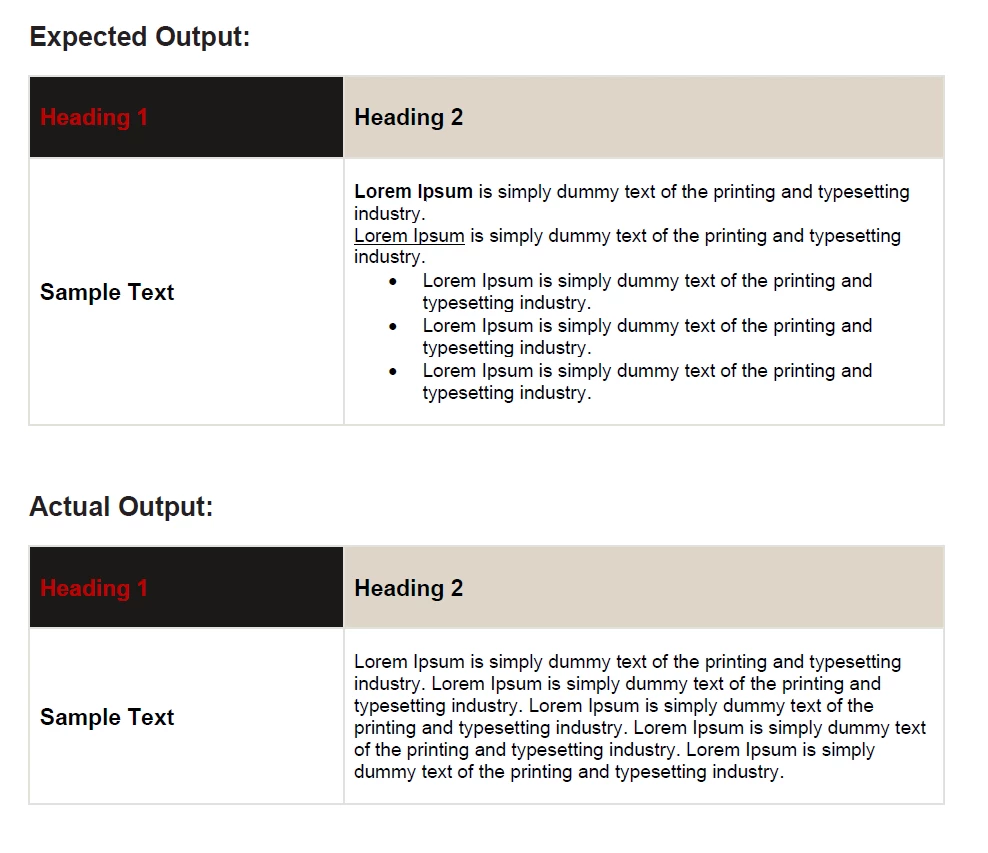
But as of now, I could only display it as normal text as Appian ignores all the html formatted code example <div>, <p>, <li>, <b> etc.

13 replies

mikes0011
Brainy
January 27, 2021

This is possible but rather complicated.  First you should look up a primer on WordML, the special flavor of XML used in the background by Word to create formatted text (and basically everything else).  It's not too unlike HTML in coding style, but the syntax is a little different and all the keywords are pretty much unique to WordML.

Second you'll need to build expression rules to parse your desired formatting into WordML, then arrange that text such that it can be inserted into your Word document.  Anything you pass into the replacement field in the general Word from Template smart service, will be injected directly (and literally) into the word file, meaning you can inject XML as needed (you'd need to break out of the current text string, inject your XML, then open a new text string at the closing).  Using this method you can create pretty much whatever you want in a Word file, even N-row N-column tables (though again it's super complex).

The Expression Guru
venkatesha0004
January 28, 2021

Thanks [mention:b45a4f6a20b14a008e4e0ec732a8bf98:e9ed411860ed4f2ba0265705b8793d05]
I will explore more on WordML..

mikes0011
Brainy
January 28, 2021

Also: what Appian version are you currently on?

The Expression Guru