
February 10, 2025
Solved

Repeat Table Header on page break in HTML to PDF - Not Working with [thead] tag

  • February 10, 2025
  • 4 replies
  • 0 views

Hi All,

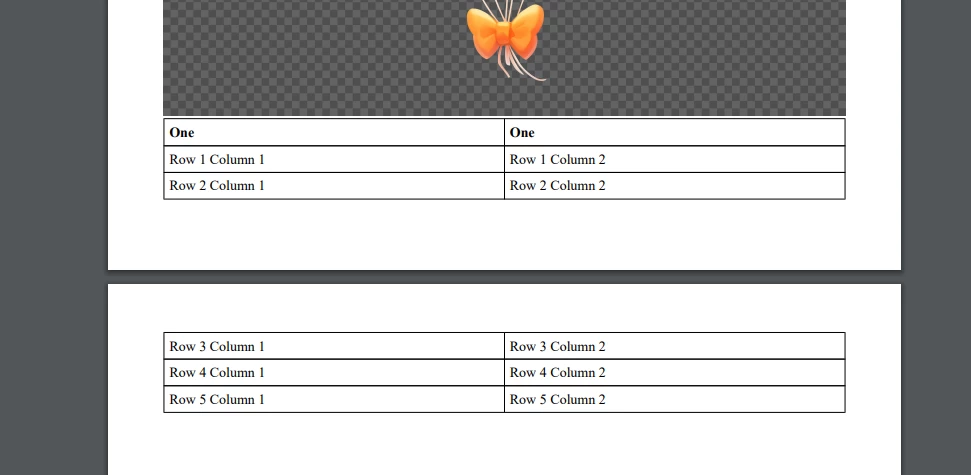
I am trying to display the table header on repeat when there is page break inside a table when using the plugin html to pdf. I have tried most of the options, has someone faced trouble with this or implemented the same?

Attaching the html code


One One
Row 1 Column 1 Row 1 Column 2
Row 2 Column 1 Row 2 Column 2
Row 3 Column 1 Row 3 Column 2
Row 4 Column 1 Row 4 Column 2
Row 5 Column 1 Row 5 Column 2

The generated pdf is as follows: 
Best answer by stefanhelzle0001

I use this template

https://github.com/danfickle/openhtmltopdf/wiki/Page-features

and have zero issues with tables. Headers are repeated on each new page.

4 replies

stefanhelzle0001
February 10, 2025

I use this template

https://github.com/danfickle/openhtmltopdf/wiki/Page-features

and have zero issues with tables. Headers are repeated on each new page.

February 12, 2025

Hi Stefan,

Thanks for the template. I did not use the -fs-table-paginate: paginate; attribute in the tables. 

gayatria0439
February 10, 2025

Hi [mention:7771c68f028449048660bd61a8ec04e8:e9ed411860ed4f2ba0265705b8793d05] ,

Firstly, I have reviewed your code and noticed that there is an extra <div> tag at the image tag. If you didn't add this tag intentionally, try removing it, as it is causing extra space above the image. Additionally, try setting padding: 0 for both the img and body tags. I ran the code and identified these issues. 

And To handle this issue, I think we should first set the page breakers and implement the <thead> and <tbody> accordingly. Alternatively, we could create a table by manually duplicating the headers after a specific number of rows. I’m not sure if this would be the best practice, but we could manage it using repeated <thead> and specific <tbodyy>like this.


February 12, 2025

Hi Gayatri,

Thanks for your input. Including the logic to consider the page break to the table helped to achieve the fix needed. I wanted to repeat the table header automatically on each page break, so manual breaking would be difficult.
