larsenr0001
New Participant
Feb 3, 2021 9:17 AM UTC
Solved

Sending multiple images over a dynamic DOCX template smart service

Hi All,

I have a requirement where i need to pass two different images over different location in docx dynamic template.

«[#list logo as logo]» image«[/#list]»   location 1 .

«[#list lang as lang]» image«[/#list]»  location 2.

As there are two images to be added , i am passing ={logo:pv!photo,lang:pv!photo} to the Image input parameter of the smart service. But only the logo paired image is getting displayed and the other one doesn't show up.

So can anyone help me in the syntax or the annotations needed to get these images rendered?

acaciob0002
Participating Frequently
Feb 11, 2021 6:39 AM UTC

Hi Larsen,

Probably you already found the solution by now, however as the question still marked as Not Answered I hope is not too late for try helping you out.

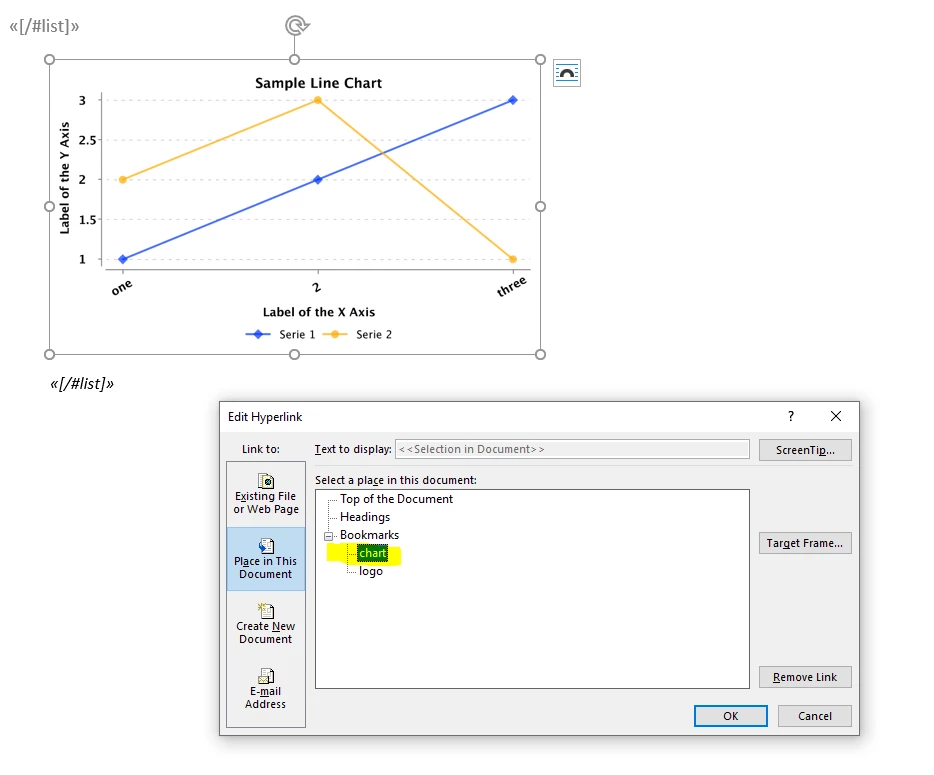
The way how you have configured the pv! And the MergeField are correct, I believe that the only thing missing for you is to create Bookmarks in the hyperlink of the images, please check the screenshot of my example.

Example of my input parameter: ={logo:pv!logoDocument,chart:pv!chartDocument}

In your case you would need to create 2 bookmarks, one “Logo” and one “Lang”

Regards,

Acacio B.

9 replies

acaciob0002
Participating Frequently
Feb 11, 2021 6:39 AM UTC

Hi Larsen,

Probably you already found the solution by now, however as the question still marked as Not Answered I hope is not too late for try helping you out.

The way how you have configured the pv! And the MergeField are correct, I believe that the only thing missing for you is to create Bookmarks in the hyperlink of the images, please check the screenshot of my example.

Example of my input parameter: ={logo:pv!logoDocument,chart:pv!chartDocument}

In your case you would need to create 2 bookmarks, one “Logo” and one “Lang”

Regards,

Acacio B.

larsenr0001
New Participant
Feb 11, 2021 7:55 AM UTC

Thanks a lot [mention:b389a349840947d58879708f8b0249f2:e9ed411860ed4f2ba0265705b8793d05] , the above solutions works [emoticon:c4563cd7d5574777a71c318021cbbcc8]

Known Participant
Sep 27, 2021 11:02 AM UTC

Helo Larsen,

I was going through the post and had a similar kind of required. In my case I have 4 images to insert into the document.

I had two questions regrading -

1- When I copy the image field from the Document Plug it auto create the logo bookmark. But when I try to copy the image again the bookmark is not created. I tried several ways to get the bookmark created but in vain nothing worked for me.

2- There is an issue with parsing when trying to generate the document through the process. For single image I dont see any problem.

I have attached the template I'm trying to add the images. Can you please let me know if the template is correct?

Looking forward for your reply.

Thanks & Regards

Girish Katti[View:/cfs-file/__key/communityserver-discussions-components-files/19/DummyTemplate-_2800_1_2900_.docx:320:240]