
June 23, 2026
Question

Special characters getting removed with clean function in documents

  • June 23, 2026
  • 5 replies
  • 0 views

Hi , I am facing an issue in pdf generation. that sometimes  frech and spanish letters getting eliminated from the document generated , letters like à, é. ó. I am using clean fucntion before passing the sentences to do document template.  If I don't use clean the generated document dont even getting saved in the process output even for english templates. Below is smart services I use to get the pdf generated. 

This is how it appear in the grid 
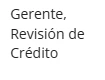
This is how it looks when printed,

Is there any way to fix this.

5 replies

stefanhelzle0001
June 23, 2026

Could it be that you are using a custom font? If yes, does this font include the glyphs for these letters?

June 23, 2026

Hi [mention:a11f77a729fb4db2af76b09948583328:e9ed411860ed4f2ba0265705b8793d05]  I am using the Tahoma font  in the template html expression. But I am not aware of the glyphs or how to include it to the template. 

stefanhelzle0001
June 23, 2026

Glyphs are the visuals symbols for each character included in the font file. There is no way to add them. Try to use the default font for testing.

shubhama926776
June 23, 2026

Don't use clean(). It strips accented letters (à, é, ó) along with the invalid characters. The document only fails to save because of invalid XML control characters in the source text, so remove just those with regexreplaceall("[\x00-\x08\x0B\x0C\x0E-\x1F]", yourText, "") and keep the template UTF-8 encoded. 

Few Samples

a!localVariables(
  local!samples: {
    "Gerente, Revisión de Crédito",
    "Café Ã%A0 la française",
    "Bad" & char(8) & "control" & char(11) & "chars",
    "Mix: José" & char(8) & " GarcÃ%ADa ó"
  },
  a!forEach(
    items: local!samples,
    expression: {
      withClean: clean(fv!item),
      withRegex: regexreplaceall("[\x00-\x08\x0B\x0C\x0E-\x1F]", fv!item, "")
    }
  )
)