July 12, 2022
Question

Activity chaining in start process smart service

  • July 12, 2022
  • 4 replies
  • 0 views

Question - whether activity chaining is followed in start process smart service or not?

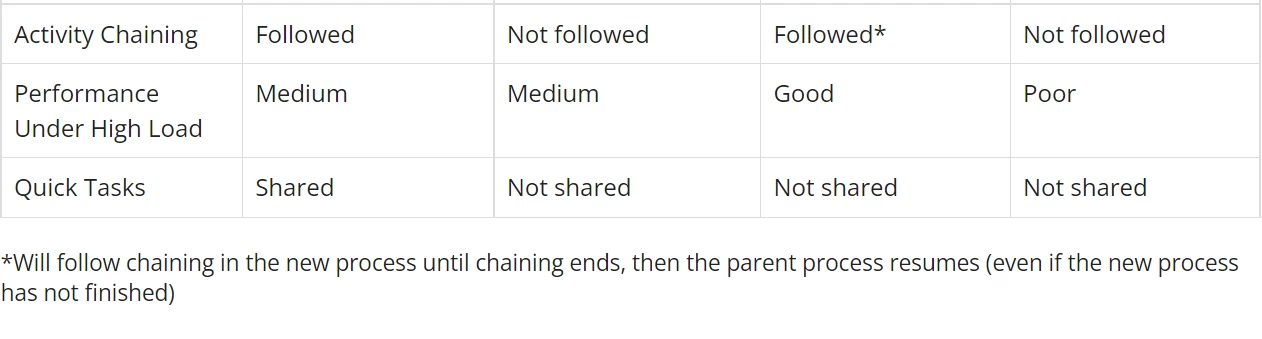
The start process smart service calls the child process asynchronously and in asynchronous call the parent process does not wait for child process to complete . In documentation , it is mentioned that it followed, but their is condition that, " Will follow chaining in the new process until chaining ends, then the parent process resumes (even if the new process has not finished) ". 

I tried so many times,  but every time it did not follow the activity chaining .

I'm in confusion, whether the activity chaining is followed or not ? if start process smart service follow the activity chaining (as it is mentioned in documentation).then please give an example so it will be helpful to understand and in what cases it follow the activity chaining?

Thankyou 

4 replies

mikes0011
Brainy
July 12, 2022

What did you do to verify chaining is not followed into the new process instance created by the Start Process node?  Just fyi, I don't expect a user will be chained to a task contained in an instance created via Start Process, but that's not the same as the process nodes executing with the increased priorities caused by chaining (which is a whole separate thing).

The Expression Guru
csteward
July 12, 2022

Yes essentially you will not be able to chain a user to a task in the asynchronous sub, but you can configure chaining if you would like the parent process to wait until some unattended processing, such as data updates, complete in the sub process.  Then after these chained unattended nodes complete, the parent process will resume, regardless of the sub process having been completed in it's entirety.

thenmozhim
August 3, 2022

From the record dashboard summary view, if I call "Start Process" via a link[Download as Excel]/button (Assume process is generating an excel and all nodes are chained), is it possible to display the generated excel document to user without manual refresh on the view? 

mikes0011
Brainy
August 3, 2022

yes.  you would simply add the correct "onSuccess" saveInto, capturing the PV value storing the generated document ID into a local variable.

The Expression Guru