
Adding foreign key to multiple records in script task
Hello [emoticon:c4563cd7d5574777a71c318021cbbcc8],
I was going through the product training videos from the Appian Academy and I came across this trick which I wanted to show you.
Scenario : Lets say we have a table whose primary key would be a foreign key to some other table (like an Order table whose primary key will be a foreign key to Order_Items table)
In such scenario, when we insert the record in the first table (order table) , we need to extract the ID of the inserted row and we will use a script task to update the ID to the other table rows (Order_Items)
In the script task we have couple of ways to update the foreign key as suggested in the below answers
But the trick I found is, as below. It can be found in the community edition process name : AA New Estimate (Notify)
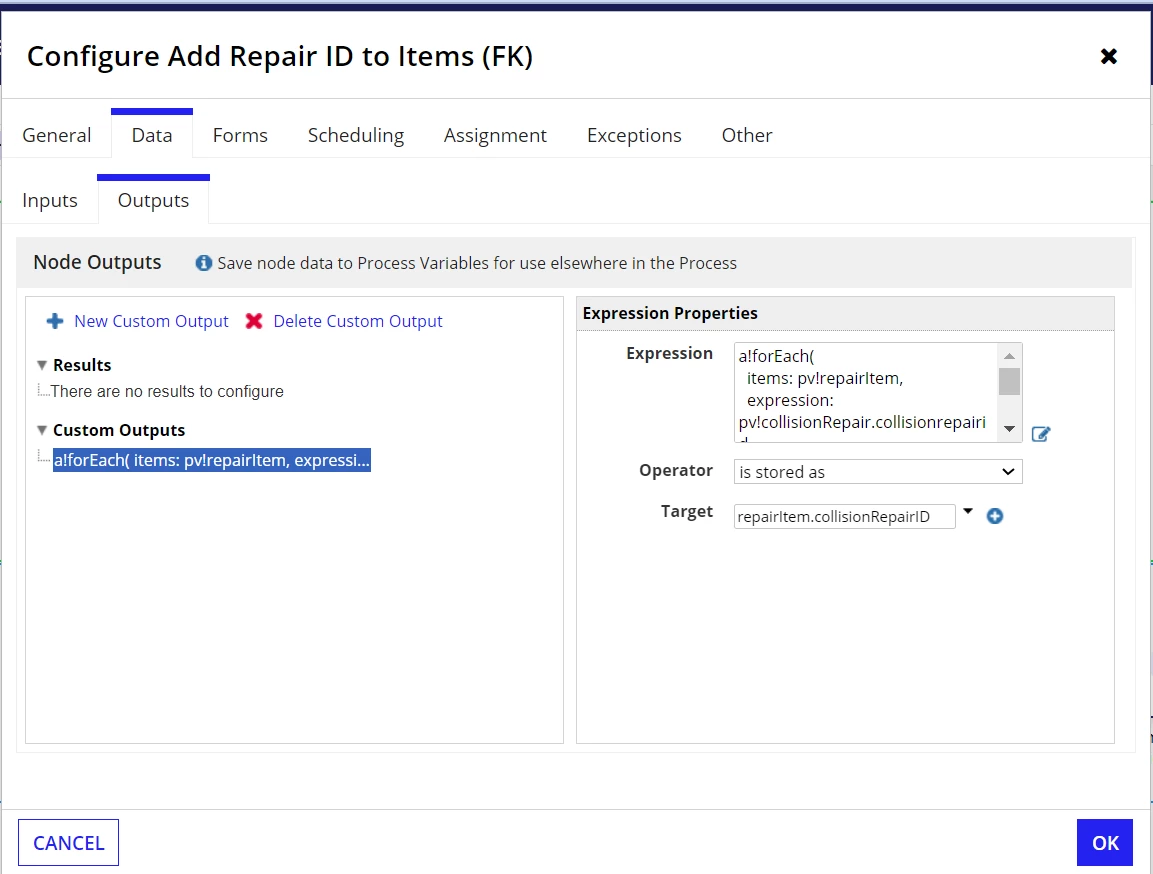
In the script task output's custom output, they used the below expression and operator "is stored as" and the target the destination table's foreign key field.
a!forEach(
  items: pv!repairItem, // Order Items table
  expression: pv!collisionRepair.collisionrepairid // Primary key from Order table
)
I have found it clean way of updating the table with foreign key. But I don't know how useful is this. Since the code is written by Appian Community, I think they will use the best code.
Any insights / suggests / corrections are always welcome.
Thanks [emoticon:c4563cd7d5574777a71c318021cbbcc8],
Vasu