November 25, 2022
Question

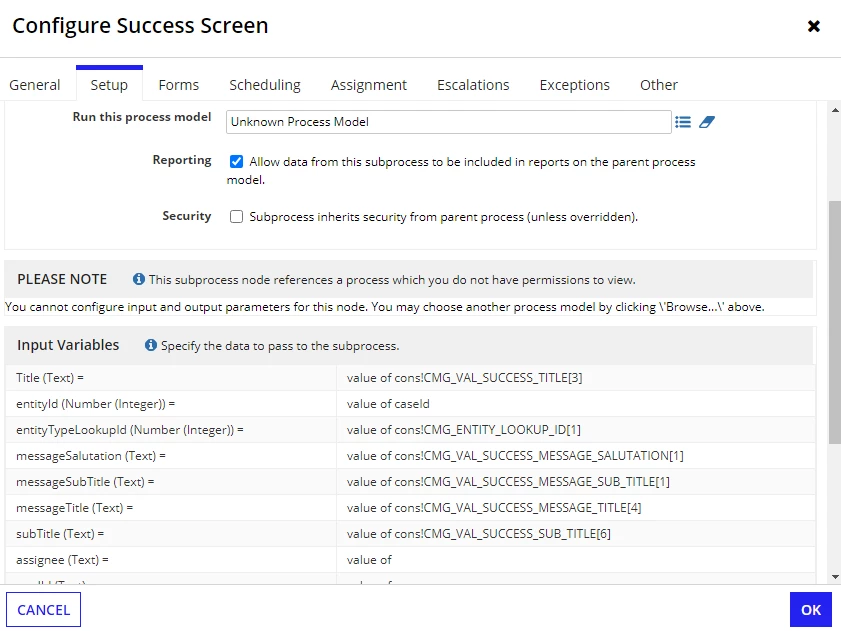
After successful deployment, getting an error at UAT!

  • November 25, 2022
  • 24 replies
  • 0 views

Hi,

After successful deployment, I am getting the above error at UAT in the parent process because of the subprocess.

    24 replies

    ravis5657Author
    November 25, 2022

    Hi [mention:ef600ff8f5d2497eb2def2126dc89484:e9ed411860ed4f2ba0265705b8793d05],

    May you please help me in this?

    richardm900458
    November 25, 2022

    hahaha what an exclusive request. Do you take support form others as well?
    a) are all permissions set for the processes and constants involved? is the user in the right groups?

    b) are all called subprocess models deployed?

    ravis5657Author
    November 25, 2022

    Thank you for your response [mention:c03f69cc9b264af29d5e31ca80c64eff:e9ed411860ed4f2ba0265705b8793d05]!

    Yes, all are fine.

    stefanhelzle0001
    Brainy
    November 27, 2022

    I think this is a simple error. The referenced process model does not exist on that environment. You will need to deploy it.

    ravis5657Author
    November 27, 2022

    Hi Stefan,

    Thank you for your response!

    Firstly, I redeployed the process model and even its all dependents ( also then all were showing "not changed") but still showing me the same error.

    Secondly, I searched for that process model in the designer and it is in the env.

    Thank You.

    stefanhelzle0001
    Brainy
    November 27, 2022

    OK. Could it be that this model has the same name, but is a different model? Did you verify that the UUIDs are the same?

    ravis5657Author
    November 28, 2022

    Hi Mike, this is the actual problem after deployment!

    mikes0011
    Brainy
    November 28, 2022

    The issue you're experiencing here isn't related to the issue in the other thread, as far as I can tell.

    To solve the problem seen here, I'd suggest you re-deploy the parent process and all its precedents from the lower environment, until the entire contents of the app package match.  Before doing that, use the Missing Precedents Checker to make sure there are no subprocess models missing from your app package.

    The Expression Guru
    ravis5657Author
    November 28, 2022

    Okay, I will do this again and come back to you.

    Thank you.

    richardm900458
    November 29, 2022

    i think stefan mike and me have a similar feeling. there is anything wrong with permissions or that the process model is not available in this environment. -> whats the node you are using?

    ravis5657Author
    November 29, 2022

    I don't know why this error occurred but when I changed/ save and republished the process model just to get "Changed" status from "not change" status while deployment.

    And redeployed the process model then it works fine as expected [emoticon:d6dd260102fd406884fc96b8bc59760b].

    richardm900458
    November 29, 2022

    did you ever published the process model before when this node was created :)? 

    ravis5657Author
    November 29, 2022

    But, thank you so much guys for your constant support [emoticon:c4563cd7d5574777a71c318021cbbcc8].