

yoelf0001
January 4, 2022
Question

Assign a user to a task in a process dynamically

  • January 4, 2022
  • 9 replies
  • 0 views

Given a string containing a username (this can change easily to user first + last name),

I would like to assign a task.

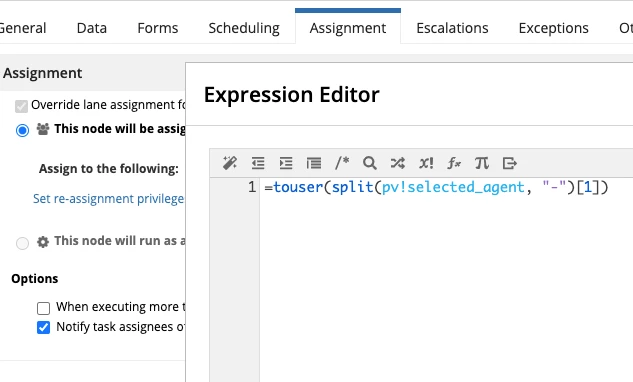
I am using the following expression to get the user

=touser("Yoel.Feuermann-yoel.feuermann@zencargo.com", "-")[1])

if I try the above in a FORM - it works.

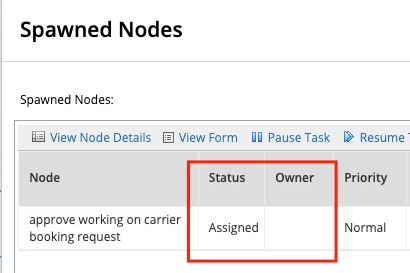
but If I have it in the assignment expression - it doesn't assign properly
it gets assigned, but to an empty user: 
9 replies

mikes0011
Brainy
January 4, 2022

Can you post a screenshot of what the current value of pv!selected_agent is in your process instance where you tried this?

The Expression Guru
yoelf0001
yoelf0001Author
January 4, 2022

sure

I know it's a bit small. it says: yoel.feuermann@zencargo.com-yoel.feuermann@zencargo.com

since the email is my username

mikes0011
Brainy
January 4, 2022

I'm unclear why you are using a dash-separated string instead of an array, but I assume you have your reasons.  I'm unclear what exactly isn't working for you; one pitfall I'd like to note, in case you've missed it, is that any time you edit the "assignment" box via the "Edit Expression" button, the edited expression is appended to previous entries in that box for some reason, instead of replacing the previous expression.  I often recommend completely clearing out the assignment picker box then pasting in an expression fresh, though you can also click into the box and use the Left / Right arrow-keys to navigate around and ensure there's only one expression entry.

The Expression Guru