
October 19, 2022
Question

Can't access output variable from user input task.

  • October 19, 2022
  • 9 replies
  • 0 views

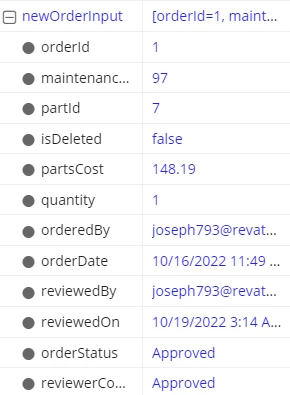
I'm using a basic form interface to gather some data for an order approval. All of the relevant data is being stored in a CDT entry, a rule input called newOrderInput. The interface is used as the form for a user input task, and I'm trying to configure it to output to a process variable for storage in my data entity. I'm attempting to access it using ac!newOrderInput but it gives me an error, saying variable is improperly scoped. What can I change to access the rule input? 
    9 replies

    gopalk2865
    Participating Frequently
    October 19, 2022

    Have you configured this input on forms tab of user input task?

    October 19, 2022

    Yes, but it appears that that only affects input into the task.

    October 19, 2022

    Hi, to configure the output values we simply need to pass them in saveInto of the input variables and if you want to pass something into the task you can pass through values.

    October 19, 2022

    I tried this but it looks like it saves that value as soon as the task begins. I need to wait until submission before the correct values are in my output.

    October 19, 2022
    I tried this but it looks like it saves that value as soon as the task begins.

    I don't understand what you mean by this but the data which the user inputs into the form is saved to process variables only when the user submits it. 

    What exactly do you want to have?

    stefanhelzle0001
    Brainy
    October 19, 2022

    Could it be that you configured the saveInto for that same variable on the data inputs tab as well? If yes, I suggest to remove the custom output and just use the configuration on the input tab.

    The reason is, that all save operations, and that includes the saveIntos defined on the data input tab, will evaluate at the same time. This leads to a race condition.