
July 10, 2024
Question

Can we merge custom cells using write to data store entity plugin

  • July 10, 2024
  • 10 replies
  • 0 views

Do we have any possibility of writing merge custom cells using write to data store entity,

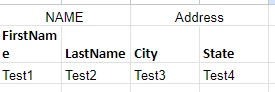
Firstname, lastname, city and state are fields from DB. I want to write Name and address but name column should be a merge cell i.e. A1:B1 , same goes with address column. We have the possibility of doing this with the template i.e. keeping this template. But what if, we dont want to use a template then do we have any option.
10 replies

konduruc733182
July 10, 2024

If you have the columns already in DB for First name, Last name, city and state. where do you want to merge and why? 

July 10, 2024

The top one, Name and address , these are the custom values

mikes0011
Brainy
July 10, 2024

What do you mean by "merge" here?

What would the output look like / what would the end result of the "merge" be?  The DB is not the same as an Excel file...

davidj137213
July 10, 2024

WHat do you want to do is merge cells, when reading or when writing data? If you have that info in the DDBB, why would you want to merge the data in another column?

July 12, 2024

Firstname, lastname , city, state are in DB but not the upper ones i.e. NAME and Address. So when we will writing data to excel using write to data store entity, i am able to write Name and address using custom cells values and posiitions but the cell is not getting merged i.e. NAME should be in A1:B1 and Address should be in C1:D1

July 11, 2024
Custom Cell Positions and Custom Cell Values parameters can be used to write any data to an Excel file while using the Export Data Store Entity to Excel smart service.
Ex.
Custom Cell Positions: {"A1", "B1"}
Custom Cell Values: {"test@test.com", "07/10/2024"}
However, you can't merge cells.