

manjit.1486
May 3, 2024
Question

CSV File: Remove quotes from the file.

  • May 3, 2024
  • 36 replies
  • 0 views

Hello Everyone,

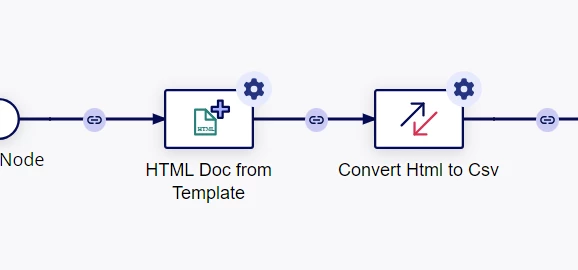
I am converting HTML to CSV using this process nodes and it's working fine. Although I can export data store entity to CSV- but there is different requirement, so I am not using this approach. Please see below screenshot. 
Requirement: When I open that CSV file in Notepad++ I see this:
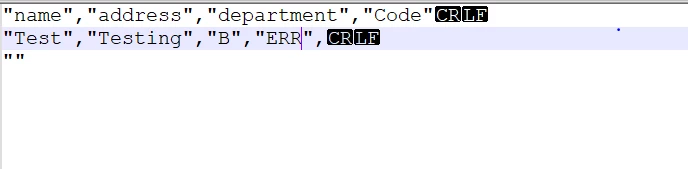

I need to remove these quotes in a file. How can I achieve this?

Thanks

36 replies

mikes0011
Brainy
May 3, 2024

Can you go a bit more in depth into your use case / what you're hoping to accomplish?

To clarify, CSV files use quotes as a very important piece of their formatting; if you simply stripped all quotes out, then you'd likely end up with an otherwise hard-to-use blob of plaintext.  Maybe this is what you *really want*, but I'm doubtful that it's that simple.

manjit.1486
May 3, 2024

Yes, I understand. But it's requirement that hey want a format of file without quotes as this file upload somewhere and without quotes only work according to format.

mikes0011
Brainy
May 3, 2024

Well, you can always read the CSV file into Appian then use the Text from Template node to construct a brand new file in whatever format you want, even if it's just the same values exported as-is with just commas separating them and no additional formatting.

csteward
May 6, 2024

NOTE, if you are only removing quotes from the CSV file, you may be left with values within the quotes that contain a comma that is not intended to be used as a delimiter, this will break your entire file.  This is the purpose of quoting all values within a CSV, which is essentially a standard that all systems designed to accept CSV should honor, in my opinion.

And what is the data like that is coming into the initial HTML node, from a DB query etc?  Can you utilize an expression rule to build the CSV file?

In all the CSV files I create, I generate the contents via an expression rule, which gives you full control over the output, then run that into a Text Doc from Template node which only has one placeholder (for the entire text).  As I type this however I realize that all of my CSV files are SFTP'd out, which is where I convert them from .txt to .csv, I'm not sure if we have an other way to change file types in Appian..

manjit.1486
May 6, 2024

I am taking data from process variables. because at this time data is not saved into database which is the reason I am not using Export data store entity to CSV. 

What I have done. I have used node HTML Doc from Template. In this template I have designed a table form data as mentioned below..


###details###


In ###details###- I have created a rule that will get data from process variables. Followed by that - all data converted into csv file using HTML to CSV smart service.

manjit.1486
May 6, 2024

HI [mention:b45a4f6a20b14a008e4e0ec732a8bf98:e9ed411860ed4f2ba0265705b8793d05]  can you guide this thing? Is it possible to change the extension of text file into CSV?
Like I am able to achieve the text document from that smart service. Can we update the extension of that documnet to CSV?