helmuta0001
May 4, 2021
Solved

Exception Processing with Timer and Rule

  • May 4, 2021
  • 12 replies
  • 0 views

We have several Process Model that have nodes for user tasks.  A lot of these nodes need to terminate based on a couple of decisions.  The first being a timer (that is configured to skip this node when the timer expires) and the second being a rule such as "and(not(pv!isManageSubmit),pv!isUnlock)".  We are seeing a lot of orphaned processes that never complete and most seem to be stuck on a node with this type of a configuration.  In one process we were able to put the rule before the node in an XOR and just have the timer for the exception and it works great.  Has anyone else experienced this situation?  Is this a bad practice?

Thanks in advance for any information someone can share.

Best answer by csteward

Additionally, in a stuck instance, can you verify that pv!isUnlock is true(), and this node is still active?

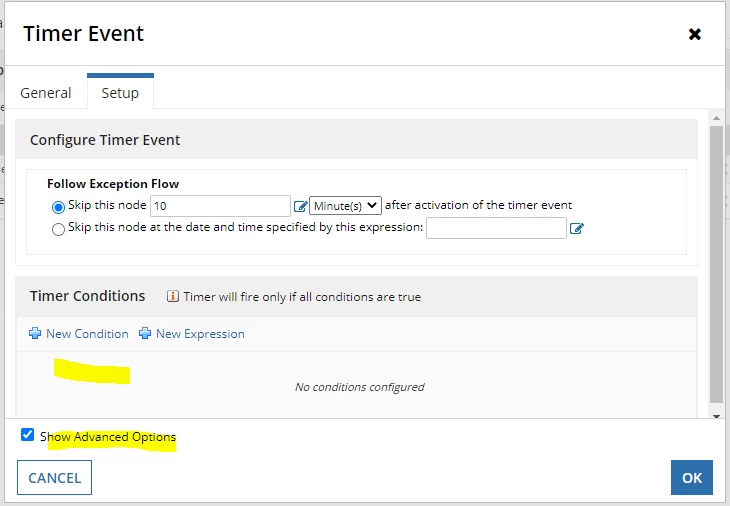
For the Timer, are there any Advanced Options configured?

12 replies

csteward
May 4, 2021

We use this type of setup and I haven't had any issues with it.  I would say it is standard practice to have a few exceptions on a User Input Task.  Are you able to verify in a 'stuck' process by monitoring, that the variable values are false for pv!isManageSubmit and true for pv!isUnlock, where the exception should be firing but it is not?

If you are able to share screen shots of the variables when monitoring, and the exception configurations, that would be helpful.  

helmuta0001
May 4, 2021

Thanks Chris.  We will take a look.  Unfortunately, I can't share a lot more information because of the client's security requirements.

mikes0011
Brainy
May 4, 2021

Redacted screenshots of process instances would work well and should be easy to produce (my favorite freeware screenshot tool, "Greenshot", has this built right in).

If all else fails, you might be able to reproduce the issue in a separate/new process model with no sensitive information contained in it.

The Expression Guru
mikes0011
Brainy
May 4, 2021

I agree with Chris above, this might require some sort of screenshot showing how and where your process instances are stuck.

Just a hunch (but not sure if this is directly related), instead of using an AND() statement in a rule node, you should just add separate expression inputs for each part, since the rule already functions like AND().  This is partly because the AND() function itself has a quirk (last i checked) where it will evaluate NULL values as if they're TRUE, causing unintended side-effects sometimes.  My suggestion here merely simplifies this somewhat.

The Expression Guru
helmuta0001
May 4, 2021

This is one of the configurations that I can share.

This the rule portion

This is the timer.  We are using a constant for the number of minutes

mikes0011
Brainy
May 4, 2021

are these configurations both on the same node or on separate nodes?  what type(s) of node are they contained in?  what does the process flow do after these are executed - does it just go to a terminate node, or something else?

The Expression Guru