
August 13, 2021
Question

Export Feature in a Process Model

  • August 13, 2021
  • 4 replies
  • 2 views

I am trying to export data from an editable grid in an interface to a PDF file. The only problem is that the data that I have managed to get exported does not appear displayed with each field being displayed in different rows as it was supposed to. It is displaying as showed below:
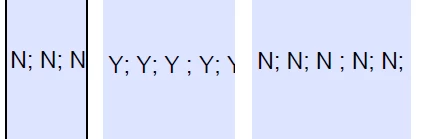
I have tried using "char(10)" in between lines but it has not worked. Below, an example of the code that I have implemented in order to do so:
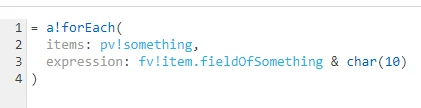
Could you please help me understanding how to get something like this:

N;

N;

N;

(...)

instead of something like this: N; N; N; (...)
???

Thank you for your attention.

4 replies

mikes0011
Brainy
August 13, 2021

joinArray(
  a!forEach(
    items: pv!something,
    expression: fv!item.fieldOfSomething
  ),
  char(10)
)

Also note: this will probably only display the way you were expecting (showing line breaks correctly) when you view the "raw" output in the expression editor.  In a process model you probably won't be able to see the expected formatting in any of the default ways, but it's still there.  To see it you can pass it into an interface and display it i.e. in a paragraph field, or rich text display field.

The Expression Guru
lust0002Author
August 16, 2021

First of all, thank you for your help Mike!!
I want to pass the data to a PDF File, and not into an interface. I am passing data from an interface, to an exported PDF file through a Process Model

mikes0011
Brainy
August 16, 2021

Assuming the PDF respects the "char(10)" character, that should work.  I forget if I've tried this (and it might depend on the specific method you're using to generate the PDF, too).

The Expression Guru