
April 5, 2024
Question

Function for whoever designed a process model

  • April 5, 2024
  • 18 replies
  • 0 views

Hi Team,

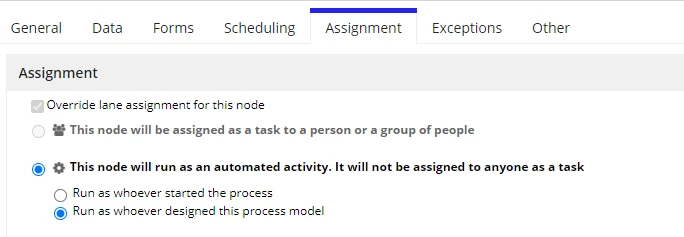
There is any function name in appian that we can find out with a user as a input by option in process model under Assignment Tab Run as whoever designed a process model without checking manually one by one process model to get all process model names with that function name?

So please if you can suggest any function name it would be helpful for me.

I am sharing a screenshot below
18 replies

venkatrea696188
April 5, 2024

Are you taking about pm!creator??

yashg0003Author
April 5, 2024

Hi Venky, Processes who create there is any function that i can check in ER get a list of process model names easily?

venkatrea696188
April 5, 2024

What you are asking for a function in which you gonna pass a process model id and you want to know who designed it ?? or you gonna pass a user and you want to know what process he created ? I don't get it can you elaborate it a bit. Where do you wanna use it??

stefanhelzle0001
April 5, 2024

What do you want to achieve? The screenshot you shared is not relevant for your initial question.

yashg0003Author
April 5, 2024

Hi Stefan, let I explain you with example suppose you created a process model and in any node you select this option under assignment tab as Run as whoever designed a process model so in ER i want one function and suppose i write your name as a rule input so i get that process model name as result what you have created

stefanhelzle0001
April 5, 2024

The information about the option "Run as whoever designed a process model" is not available.

What would you want to do with this?

Keep in mind that the process model designer (or owner) is always the last person that published or deployed this model. If the model is deployed through any kind of automatic deployment, the service user will be the owner of the model.

April 5, 2024

Make Use of Swim Lanes and Assign the Respective Mode how you want the process to be . 

Make Sure to Keep all the Smart Service under the System lane So all Follow the Same Assignment.

Further queryProcessAnalytics Report can Help In Much Detailed Manner But this must be taken Care while System Design as Best Practice.

yashg0003Author
April 5, 2024

okay thank you DaisyManmohan5ingh

April 5, 2024

The Best Practice to deploy process models is to use a 'system account' which will not be deactivated, as it is if process models are saved or deployed using a user name. If that user account get's deactivated because the user has left the company - you are in trouble for those process models.
I might be wrong, but I am assume that you are looking for a solution for a scenario like this kind: Find out all Process models which were stored by user 'Left the company'.
There is a relative easy solution to it -
1.) Identify the XML pattern by just exporting one process model in request. Save this XML Pattern (e. g. it contains the users id)
2.) Export all process models. Then search for the saved XML Pattern in all ZIP files, utilizing e. g. NotePad++  
3.) The result list is a list of all process models which were stored by this specific user. Then you can go from there with appropriate actions

April 5, 2024

One addition:
To fix multiple process models - just utilize the Search/Replacement feature in NotePad++
Import the changed Zip file - all process models will be fixed. 
We have used that procedure for Process models and User Interfaces to save time and effort in a bulk update.