
March 8, 2024
Question

How to Customize the UI Task timeout error message and to come out of the task

  • March 8, 2024
  • 14 replies
  • 0 views

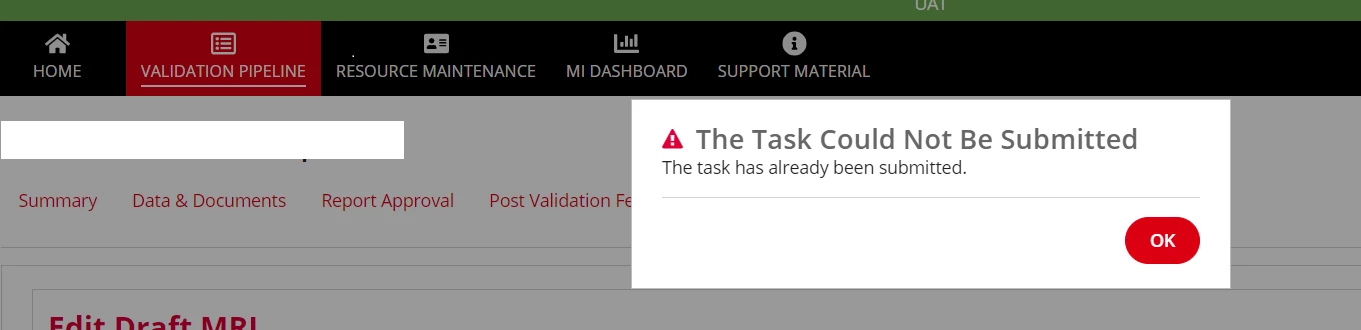
I want to show customized confirm dialog box (instead of the Appian default "The Task Couldn't be submitted" message) whenever the user input task is timed out (in our case the exception timer we have kept for UI task is 20 mins).

Also at present when the user clicks OK button in the default dialog box, then the page stays there and either the user have to press F5 to restart the process or have to click on any of the SITE tabs to come out of the screen.

Instead, I have a requirement to come out of the current UI and the system should redirect the user to the page where the process was called from eg., if the process was a related action and one of the UI task timed out, on click of OK button the system should redirect the user to the page where the process was triggered i.e., record summary page.
    14 replies

    stefanhelzle0001
    March 8, 2024

    That cannot be customized. Sorry ...

    March 8, 2024

    Thanks for your reply Stefan, is it possible to come out of the timed out UI on-click of OK button in the default confirm dialog.

    "I have a requirement to come out of the current UI and the system should redirect the user to the page where the process was called from eg., if the process was a related action and one of the UI task timed out, on click of OK button the system should redirect the user to the page where the process was triggered i.e., record summary page."

    konduruc733182
    March 8, 2024

    I don't think that can be done. The user will have to close the tab or refresh if the task is timed out. Only on successful completion of your task, your requirement will be satisfied.

    March 8, 2024

    [mention:6b81bf5785724cf2841053847c1de332:e9ed411860ed4f2ba0265705b8793d05]  You can create your popup using refreshvariable refreshinterval. of 20 minute timer, so once timer crosses 20 mins, you can show the popup and hide the old form. So when user submits, you can submit the popup he will navigate to homepage.

    This type of workaround you can try, but this will affect your process performance as tasks will be open for long time then it should be.

    mikes0011
    Brainy
    March 8, 2024

    What's the use case for having a task timeout timer of 20 minutes?  Every time I've seen one set that short (from an End User perspective) i have found it to be, let's say, unnecessarily cruel.  When I use these I almost always allot enough time that the user is almost certain to have abandoned the task completely and won't be put out by it ending automatically - like 24 hours, or at least, "1 am the next night" or something like that.