June 17, 2026
Solved

How to handle service errors in process models

  • June 17, 2026
  • 3 replies
  • 0 views

The code working from long back suddenly one day the integration failed due to service failure how to handle it 

    Best answer by amaans4178

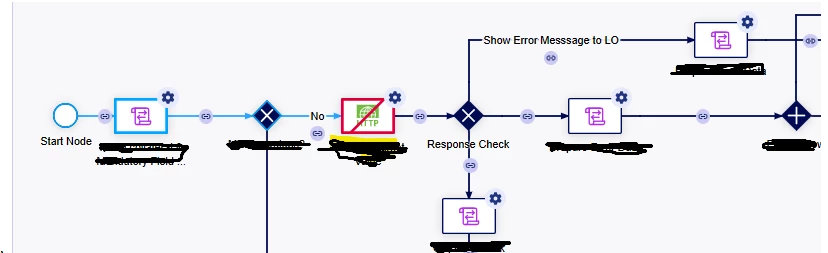
    However, as the OP's screenshot shows an actual error on the node, the process execution will halt there entirely. While checking the integration response status code is excellent practice for handling API-level failures and informing users, it won't bypass a hard node error.

    To handle these scenarios, I typically use an AND gate at the start to split the process into two parallel paths  with a Terminate Process node (in processes where we know an hard error can appear or we need to monitor it right away):

    • Path 1 (Normal Flow): Executes the standard business logic.

    • Path 2 (Timeout/Exception Flow): Starts with a Timer Event (set to a buffer based on worst case scenario of path 1 execution tim, e.g., 2 minutes), contains email node etc.

    If Path 1 completes successfully, the Terminate node kills the entire process instance, automatically clearing the active Timer on Path 2. However, if Path 1 gets stuck or errors out, the Timer on Path 2 will eventually expire, allowing the process to continue down an exception route to trigger a support email, log a database entry, or alert the user.

    What Shubham suggested is an absolute best practice that should be implemented in every process involving external systems and integrations.
    3 replies

    shubhama926776
    June 17, 2026

    Add an XOR path after the Integration node that checks success. Add an XOR path after the Integration node that checks success. On failure: show a user-friendly message and log error.message.
    The Integration smart service returns errors in its result (it doesn't throw), so for transient cases (timeouts, 408/503) build your own bounded retry loop with a timer.
    https://docs.appian.com/suite/help/26.5/Integration_Tutorial.html#add-error-handling
    https://docs.appian.com/suite/help/26.3/Automatic_Error_Handling.html

    amaans4178
    June 18, 2026

    However, as the OP's screenshot shows an actual error on the node, the process execution will halt there entirely. While checking the integration response status code is excellent practice for handling API-level failures and informing users, it won't bypass a hard node error.

    To handle these scenarios, I typically use an AND gate at the start to split the process into two parallel paths  with a Terminate Process node (in processes where we know an hard error can appear or we need to monitor it right away):

    • Path 1 (Normal Flow): Executes the standard business logic.

    • Path 2 (Timeout/Exception Flow): Starts with a Timer Event (set to a buffer based on worst case scenario of path 1 execution tim, e.g., 2 minutes), contains email node etc.

    If Path 1 completes successfully, the Terminate node kills the entire process instance, automatically clearing the active Timer on Path 2. However, if Path 1 gets stuck or errors out, the Timer on Path 2 will eventually expire, allowing the process to continue down an exception route to trigger a support email, log a database entry, or alert the user.

    What Shubham suggested is an absolute best practice that should be implemented in every process involving external systems and integrations.

    July 15, 2026

    That's fantastic! Sharing and analyzing in detail how to use an AND gate at the start to split the process block blast into two parallel paths with a Terminate Process node.