February 3, 2025
Solved

I want to run a script task after 1 second

  • February 3, 2025
  • 4 replies
  • 0 views

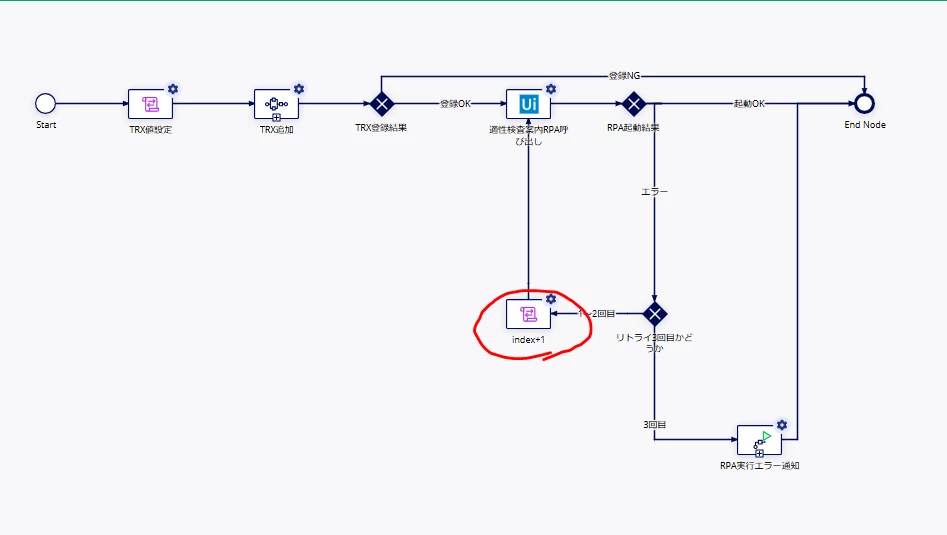
When the "index+1" script task is reached, I would like to wait 1 second and then execute the script task.
I tried to solve the problem by setting the timer, but I don't know how, so I would like to know how.

    Best answer by andrewh6762

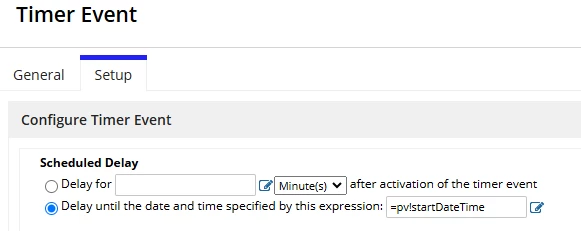
    I'd be interested in others answers too but my understanding is you can calculate that small a time skip inside the timer node but you can calculate it in a script task before triggering the timer node. So just set a pv!startDateTime variable that is set in a script task with a!addDateTime(startDateTime: now(), seconds: 1) then configure the timer event to start at that variable date time.

    4 replies

    andrewh6762
    February 3, 2025

    I'd be interested in others answers too but my understanding is you can calculate that small a time skip inside the timer node but you can calculate it in a script task before triggering the timer node. So just set a pv!startDateTime variable that is set in a script task with a!addDateTime(startDateTime: now(), seconds: 1) then configure the timer event to start at that variable date time.

    konduruc733182
    February 3, 2025
    I would like to wait 1 second and then execute the script task

    I am not sure if this is something do-able. I think the minimum need is a 1 min. 

    https://docs.appian.com/suite/help/24.4/Intermediate_Event_-_Timer.html#configuring-a-timer-event 

    Please refer this documentation 

    harshas2775
    February 3, 2025

    In the Timer setup, put now() + intervalds(0,0,1) under the 'Delay until the date and time specified by this expression field' to have a delay of 1 second. 

    stefanhelzle0001
    February 3, 2025

    What is the purpose of this delay?

    Solution:

    now() + second()