
Known Participant
Aug 19, 2022 3:24 PM UTC
Solved

Issue - MS Word 2007 Doc from Template

Hi,

I am trying to generate a word document using "MS Word 2007 Doc from Template".

The element which I am passing to a process model is having data like "Test & 1234". When I try to generate the document with this value, it is throwing an error when I try to open the generated document.
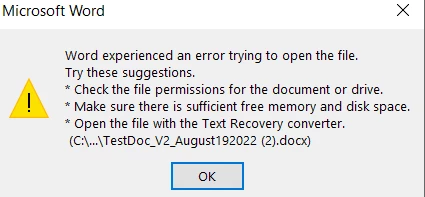
Where as if I updated the value with "Test1234" and generate the document, I was able to open the word document without any issues.

Any advises please.

Let me know if you want any further details.

    mikes0011
    mikes0011Answer
    Brainy
    Aug 19, 2022 3:41 PM UTC

    You beat me to it, lol - yes, a long time ago I developed the following expression rule that all un-sanitized text should be passed through when using this smart service.  Note this is only really needed when the incoming text will be variable (i.e. where there's a possibility that special characters will sneak in).  This is what I still use now.

    /* Expression Rule i.e. APP_UTIL_sanitizeTextForWordDocx */
    
    a!localVariables(
      local!characters: {
        "&",
        ">",
        "<",
        char(10),
        char(13)
      }, /* the ordering of these is important. */
    
      local!replacements: {
        tohtml("&"),
        tohtml(">"),
        tohtml("<"),
         ,  /* inserts a Word linebreak */
        ""
      },
    
      reduce(
        fn!substitute,
        trim(ri!input),
        a!forEach(
          local!characters,
          {
            fv!item,
            local!replacements[fv!index]
          }
        )
      )
    )

    The Expression Guru

    3 replies

    mikes0011
    Brainy
    Aug 19, 2022 3:34 PM UTC

    The Word from Template smart service does not sanitize passed-in text, meaning some of the special characters used in WordML (the special XML flavor used in the back-end in word documents) will cause the document to "break" if passed in un-sanitized.

    The Expression Guru
    hari0002Author
    Known Participant
    Aug 19, 2022 3:36 PM UTC

    Do I need to use any kind of functions to avoid this issue. Please advise.

    mikes0011
    mikes0011Answer
    Brainy
    Aug 19, 2022 3:41 PM UTC

    You beat me to it, lol - yes, a long time ago I developed the following expression rule that all un-sanitized text should be passed through when using this smart service.  Note this is only really needed when the incoming text will be variable (i.e. where there's a possibility that special characters will sneak in).  This is what I still use now.

    /* Expression Rule i.e. APP_UTIL_sanitizeTextForWordDocx */
    
    a!localVariables(
      local!characters: {
        "&",
        ">",
        "<",
        char(10),
        char(13)
      }, /* the ordering of these is important. */
    
      local!replacements: {
        tohtml("&"),
        tohtml(">"),
        tohtml("<"),
         ,  /* inserts a Word linebreak */
        ""
      },
    
      reduce(
        fn!substitute,
        trim(ri!input),
        a!forEach(
          local!characters,
          {
            fv!item,
            local!replacements[fv!index]
          }
        )
      )
    )

    The Expression Guru