
March 1, 2024
Question

Node configuration " Write to database Store" with dependent dropdown interface

  • March 1, 2024
  • 14 replies
  • 0 views

"I am working with dependent tables, and it's already functioning in the interface. However, when starting debugging in the process model, it throws the following error:

I believe this might be due to the variable in the 'Group' field, which comes from the interface as an integer variable but is presented as text in the user form. Could you guide me on how to handle the configuration of the node or the properties of the Process Model M to fix this error?"

This is what I have in my node configuration
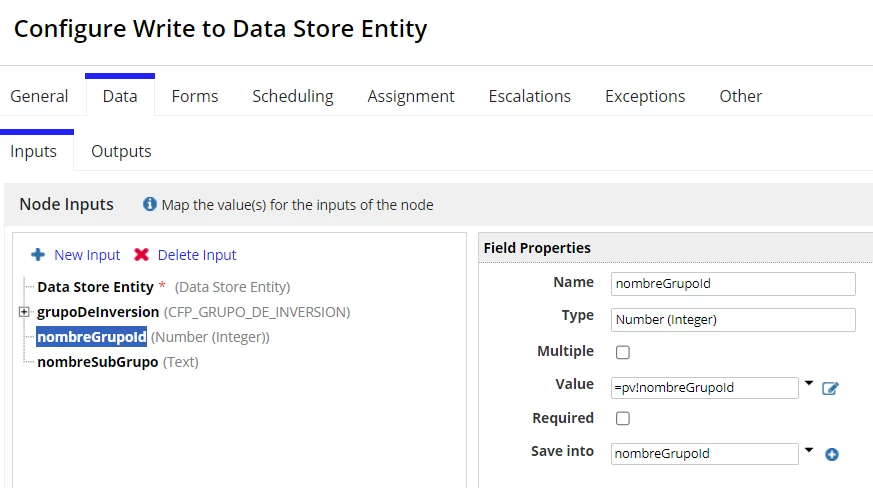
These are the variables on my Process Model´s properties
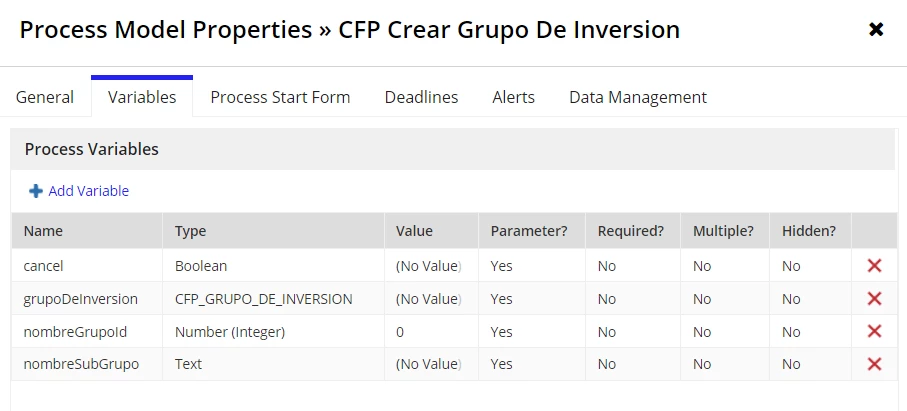
and this is my rule inputs on the interface
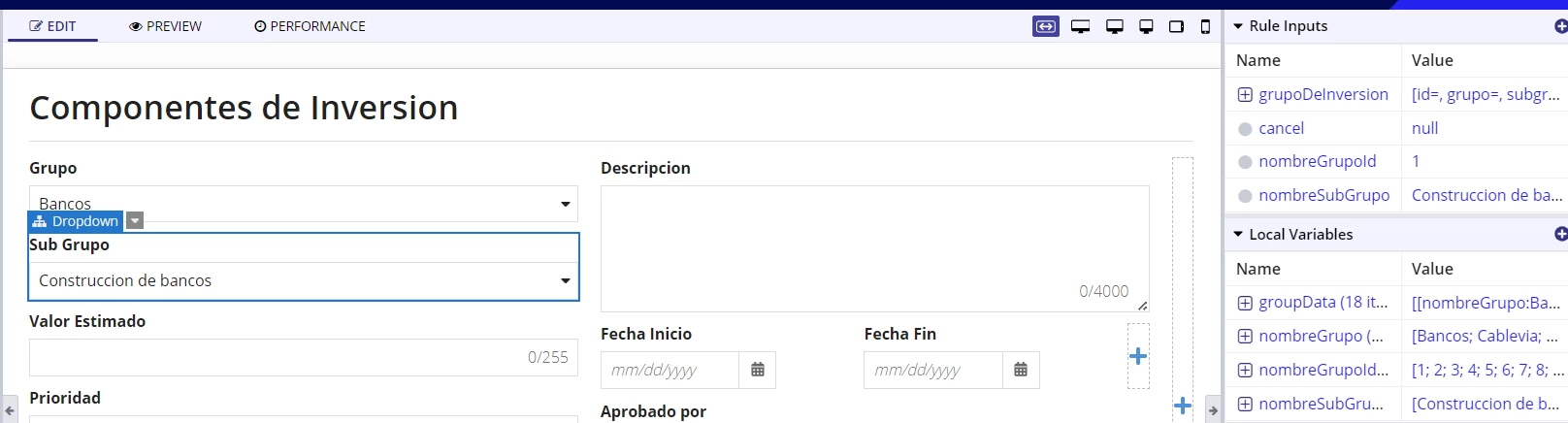
Appreciate your comments.

Regards,

    14 replies

    stefanhelzle0001
    March 2, 2024

    For me this looks more like an issue with the interface. As dropdowns are pick about the passed value matching the choicevalues in type AND value, you might want to add an if condition to check that the value is present in the choicevalues.

    March 3, 2024

    Thank you so much for your reply, I want to share my interface expression, can you guide me on how to use the if condition you are suggesting me to use?

    a!localVariables(
      local!groupData: rule!CFP_GetAllGroupName(),
      local!nombreGrupo:property(local!groupData,"nombreGrupo", null),  
      local!nombreGrupoId: property(local!groupData,"id", null), 
      local!nombreSubGrupo: rule!CFP_Q_GetSubGroupNameByGroupId(
        nombreGrupoId: ri!nombreGrupoId
      ),
      a!formLayout(
      label: "Componentes de Inversion",
      contents: {
        a!columnsLayout(
          columns: {
            a!columnLayout(
              contents: {
                a!dropdownField(
                  choiceLabels: local!nombreGrupo,
                  choiceValues: local!nombreGrupoId,
                  label: "Grupo",
                  labelPosition: "ABOVE",
                  placeholder: "--- Seleccione un Grupo ---",
                  value: ri!nombreGrupoId,
                  saveInto: {ri!nombreGrupoId,
                  a!save(ri!nombreSubGrupo,null)
                  },
                  searchDisplay: "AUTO",
                  validations: {}
                ),
                a!dropdownField(
                  choiceLabels: local!nombreSubGrupo,
                  choiceValues: local!nombreSubGrupo,
                  label: "Sub Grupo",
                  labelPosition: "ABOVE",
                  placeholder: "--- Select a Value ---",
                  value: ri!nombreSubGrupo,
                  saveInto: ri!nombreSubGrupo,
                  searchDisplay: "AUTO",
                  validations: {}
                ),

    ============================

    Thanks a lot, I appreciate it.

    stefanhelzle0001
    March 3, 2024

    a!dropdownField(
                  choiceLabels: local!nombreGrupo,
                  choiceValues: local!nombreGrupoId,
                  label: "Grupo",
                  labelPosition: "ABOVE",
                  placeholder: "--- Seleccione un Grupo ---",
                  value: if(
                    contains(local!nombreGrupoId, ri!nombreGrupoId),
                    ri!nombreGrupoId,
                    null
                  ),
                  saveInto: {ri!nombreGrupoId,
                  a!save(ri!nombreSubGrupo,null)
                  },
                  searchDisplay: "AUTO",
                  validations: {}
                ),

    BTW, using the same name for local variables and rule inputs with a different purpose can be very misleading.