

saifalik8679
Known Participant
January 13, 2022
Question

Not able to convert pdf from a merged .docx document

  • January 13, 2022
  • 4 replies
  • 0 views

Hi Appian Devs, 
I am facing an issue while converting a merged ".docx" file in my process model.
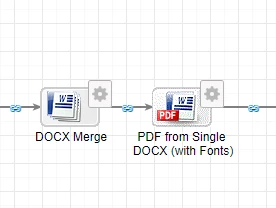
If you see the .docx file, it is merging the document as per my requirements, but when i am taking that merged document output variable to convert that document into pdf, I am getting only 2 pages of the entire docx file converted whereas the actual merged docx file is of 20 pages. 
I tried multiple approaches, the approach of sub-process and many other methods, but not able to get the complete merged document but failed.

Can you please give me the right direction?
4 replies

agamb0001
January 13, 2022

Did you get any error as in the smart service output variables  or, in the app server log ?

Also, you mentioned the merged document is 20 pages, and later you wrote you are not able to get the complete merged document,

so, was DOCX Merge successfully able to generate the 20 page document and whether you checked it by downloading and opening that merged document, if its complete?

Just trying to figure out if the issue is with DOCX Merge /  PDF from Single DOCX (with Fonts)

Also, did you do any debugging on lines of converting any sample doc you can create locally which has say more than 2 pages to PDF by this smart service ?

saifalik8679
Known Participant
January 13, 2022

Hi Agam
After merging successfully, i downloaded it and it is opening fine exactly with the 20 pages.
But after passing the pv of the same output file, i am not able to convert it

There is no exception/error in the process history and the process is being executed with grace.
The merged docx file is normal and it is converting when i use with the online pdf converters, but the pdf from single docx with fonts is creating issues in my process.

agamb0001
January 13, 2022

how about the error as in the smart service output variables

and, anything in the app server log ?