
January 17, 2023
Solved

Pass relationship field in process variable

  • January 17, 2023
  • 3 replies
  • 0 views

Hi all hope someone can help.

I am working on an integration in a process model

and I want to pass some variables to the integration step

I am assigning a recordtype value to the inputs in the data tab
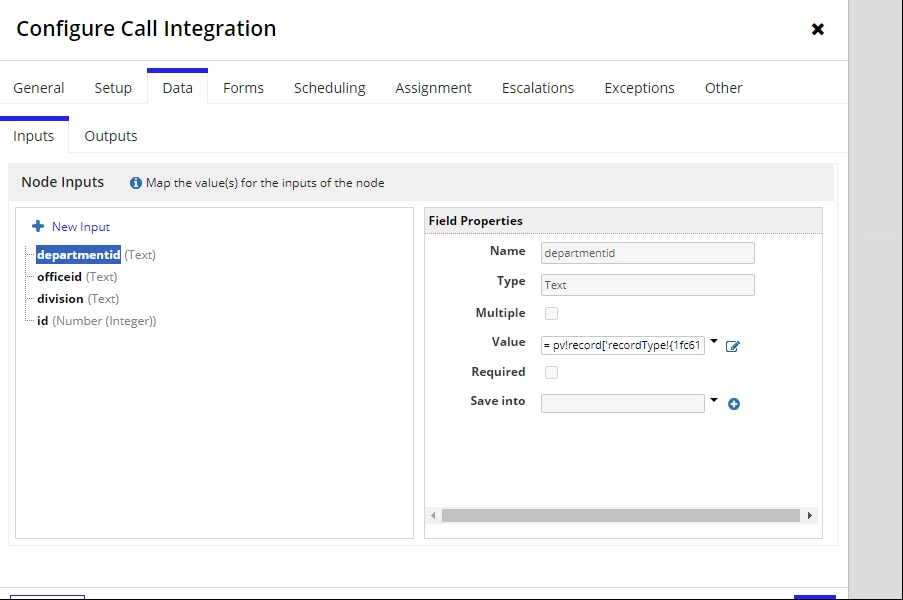
all works for division for example where I assign pv!record.recordtypexxx.division

but it doesn't work when I assign the relationship data for example

departmentid has a value of =pv!record.recordtypexxx.relationshipxxx.fieldoftherelationship

It seems that the relationship values are not being passed?

If I create an interface to display the data everything is there as expected both in the main record type and the looked up data from the related record type is there and correct.

So the relationship works.

Then why when I call the relationship data in the inputs in the integration it doesn't pick it up??????

Best answer by catev8891

thank you for the Hint Hrishikesh!

Posting here the final code I had to use to reference a relationship field to a record type in the value field of the Data inputs tab

= index(
  a!queryRecordType(
    recordType: NJW NewJoiner,
    fields: {
      NJW NewJoiner.relationships.njwPicklistGhDepartment.fields.id'
     },
    pagingInfo: a!pagingInfo(startIndex: 1, batchSize: 1),
    filters: a!queryFilter(
      field: recordType!NJW NewJoiner.fields.id,
      operator: "=",
      value: pv!record['recordType!NJW NewJoiner.fields.id]
    )
  ).data['recordType!NJW NewJoiner.relationships.njwPicklistGhDepartment.fields.id'],
  1,
  cast(
    'recordType!NJW NewJoiner',
    null
  )
)

3 replies

catev8891Author
January 17, 2023

And the integration on its own works by passing test values in the ri! of the integration. So it's all about passing the values in the ri! from the process model

January 18, 2023

To use relationship data, relationship have to be explicitly specified in "fields" parameter while querying the record.

docs.appian.com/.../Create_a_Record_View.html

After writing the record, you would need to query the record back specifying the relationship within the fields to use relationship data further in your process.

a!queryRecordType(
    recordType: pv!record,
    fields: {pv!record.recordtypexxx.relationshipxxx},
    filters: /*query filter to fecth record by its ID*/
}

catev8891AuthorAnswer
January 20, 2023

thank you for the Hint Hrishikesh!

Posting here the final code I had to use to reference a relationship field to a record type in the value field of the Data inputs tab

= index(
  a!queryRecordType(
    recordType: NJW NewJoiner,
    fields: {
      NJW NewJoiner.relationships.njwPicklistGhDepartment.fields.id'
     },
    pagingInfo: a!pagingInfo(startIndex: 1, batchSize: 1),
    filters: a!queryFilter(
      field: recordType!NJW NewJoiner.fields.id,
      operator: "=",
      value: pv!record['recordType!NJW NewJoiner.fields.id]
    )
  ).data['recordType!NJW NewJoiner.relationships.njwPicklistGhDepartment.fields.id'],
  1,
  cast(
    'recordType!NJW NewJoiner',
    null
  )
)