
August 23, 2022
Question

Permissions issue using the "Move document" service

  • August 23, 2022
  • 6 replies
  • 0 views

Hi,

We have a process that contains a "Move document" service and for a given user the process raised this error (in Production) :

The user does not have enough permissions to move the document.

- The user belongs to the admininstrator group so I don't know where else to look to find the explanation.

- The process belongs to usual 2 groups : Admins : Admin, and All users : Viewer.

- The sub-folder has been created with success.

Any other idea ?
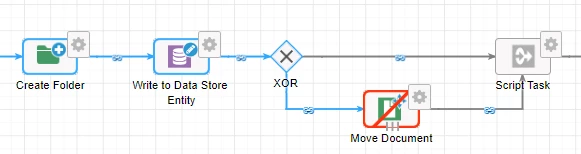
(We have another process that does almost the same action but without any error)

6 replies

August 23, 2022

Could you please check the user is having editor access to the folder to which you are moving the document?

August 23, 2022

Deepakg, the previously folder created has these rights :
Admins : Admin
All Users : Editor

mikes0011
Brainy
August 23, 2022

Make sure the node is configured to "Run as whoever designed this process model".  Your production deployment pipeline should (hopefully) already be configured such that process models are only deployed (and therefore "published") under the authority of an Admin-level service account, meaning the "whoever designed" will automatically execute under that authority.

The Expression Guru
August 23, 2022

You're right, the node is set to "Run as whoever started the process" but I don't understand why it would work for other users that belong to the same groups...

mikes0011
Brainy
August 24, 2022

Weirdly, if this (edit: i should say ANY) process is called as a subprocess, the node will execute under the authority of whatever user was the initiator of the highest-level-parent process.  If that's still not it, then there might be something else you're missing - like the fact that the user would need Editor permissions on both the original document, as well as the destination folder.  And there are still probably some miscellaneous other constraints i'm not even thinking of at the moment.

The Expression Guru