March 29, 2023
Solved

Process Node Scheduling

  • March 29, 2023
  • 8 replies
  • 0 views

Hi Experts,

We got a specific scenario from our client where we have to keep our process waiting until a time provided by user matches with the server time.

So from the UI user is providing date in one field as " MM/DD/YYYY" and time in a different field as "HH:MM:SS" and timezone in another field.
The process node must only gets triggered or move to next node only when time provided by user matches with the server time.

I'm using below code but its not working as expected

a!localVariables(  
  local!split: split(ri!endSearchTime, ":"),
  local!day: day(ri!endSearchDate),
  local!month: month(ri!endSearchDate),
  local!year: year(ri!endSearchDate),
  local!endSearchDateTime:datetime(
    local!year,
    local!month,
    local!day,
    local!split[1],
    local!split[2],
    local!split[3]
  ),
  todatetime(
    if(
    local!endSearchDateTime - ((gmt(local!endSearchDateTime) - local!endSearchDateTime) - rule!TEST_ER_TimeZoneOffset(ri!endTimeZone)) < now(),
    now() + intervalds(0, 0, 10),
    local!endSearchDateTime - (( gmt(local!endSearchDateTime) - local!endSearchDateTime) - rule!TEST_ER_TimeZoneOffset(ri!endTimeZone)) + intervalds(1, 0, 0)
  )
  )
)

where rule!TEST_ER_TimeZoneOffset takes timezone as parameter and returns the intervalads as shown in below code

a!localVariables(
  local!timeZone:ri!timeZone,
 a!match(
    value:local!timeZone,
    equals: "PST",
    then:  intervalds(8, 0, 0),  

    equals: "PDT",
    then: intervalds(7, 0, 0),  

    equals: "MST",
    then: intervalds(7, 0, 0),  

    equals: "MDT",
    then: intervalds(6, 0, 0),  

    equals: "CST",
    then: intervalds(6, 0, 0),  

    equals: "CDT",
    then: intervalds(5, 0, 0),  

    equals: "EST",
    then: intervalds(5, 0, 0),  

    equals: "EDT",
    then: intervalds(4, 0, 0),  

    equals: "AST",
    then:intervalds(4, 0, 0),  
    
    equals:"NST",
    then:intervalds(3, 30, 0),  
    
    equals: "ADT",
    then: intervalds(3, 0, 0),
    
    equals: "NDT",
    then: intervalds(2, 30, 0),  
    default:  /*UTC*/
    intervalds(0, 0, 0)
  )
)

Please suggest

Best answer by sanchitg0002

Thanks for the detailed explanation.

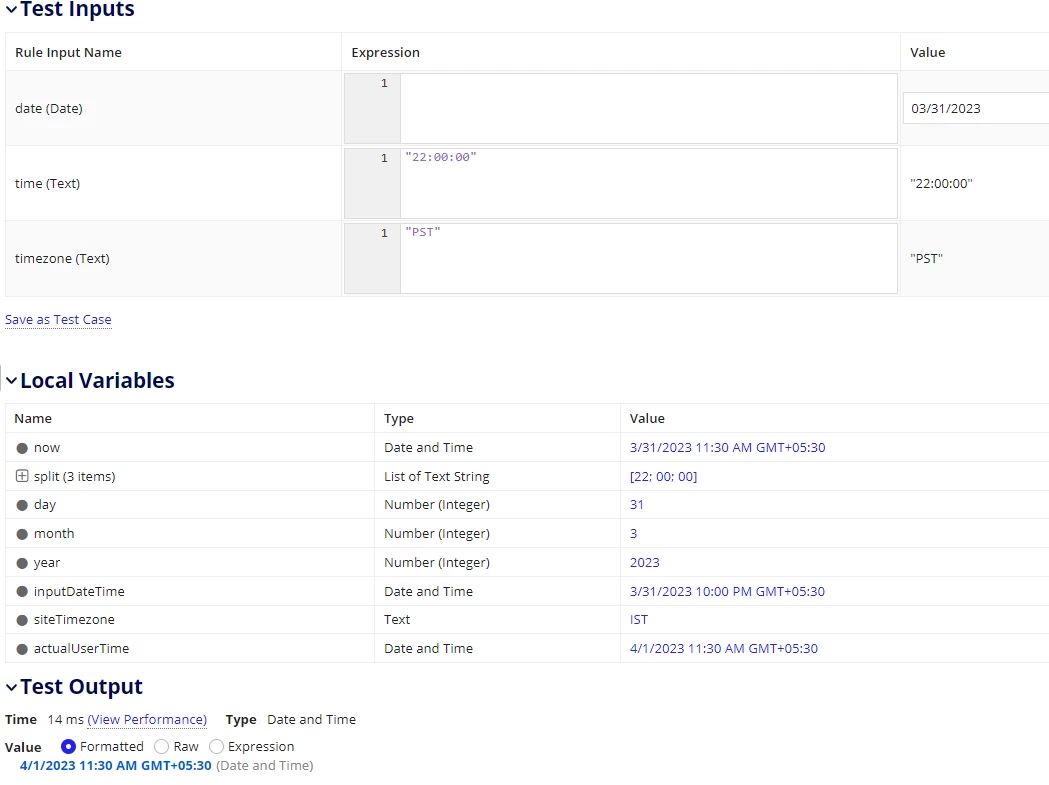
What I can understand is that you want to convert the date time input provided by the user according to the site primary timezone if the user input timezone do not matches with site timezone otherwise you keep it as is.

a!localVariables(
  local!now: now(),
  local!split: split(ri!inputTime, ":"),
  local!day: day(ri!inputDate),
  local!month: month(ri!inputDate),
  local!year: year(ri!inputDate),
  local!inputDateTime: gmt(
    datetime(
      local!year,
      local!month,
      local!day,
      local!split[1],
      local!split[2],
      local!split[3]
    )
  ),
  local!siteTimezone: usertimezone(loggedInUser()),
  local!actualUserTime: if(
    local!siteTimezone = ri!inputTimezone,
    local!inputDateTime,
    local(
      gmt(local!inputDateTime, ri!inputTimezone)
    )
  ),
  if(
    local!actualUserTime < local!now,
    local!now,
    local!actualUserTime
  )
)
   

Explanation of the code:

 So, datetime() adds timezone offset of the server to any value provided, first we need to revert it back (using gmt() ). And then check if the timezone of site matches with the user input timezone, if it does then you just compare it with now(), otherwise first we need to remove the timezone offset provided by the user so that we can have datetime in UTC (using gmt() ) and then add the timezone offset of server to get the final datetime (using local() ) to compare with now().

Hope it solves your problem. I have tested it with some values, you can try and let know if it works the way you want it or not.

8 replies

harshitb6843
March 30, 2023

Why don't you just construct a date time with a timezone value and pass it in this configuration? 

harshitb6843
March 30, 2023

My bad. I just realized that you must be doing the same but you're not able to construct the value to pass in. 

March 30, 2023

Hi Harshit,

Yes, I'm doing the same the only challenge is that values is not getting converted properly.

I want this date/time/timezone to be converted properly which is not happening for now.