

sebastiand8415
March 19, 2024
Question

Screen that requires no user input in a process model

  • March 19, 2024
  • 10 replies
  • 0 views

Is there a way in a process model to add a node with an informative screen,
that does NOT require any user input, and the process continues running
immediately after displaying the screen to the user?

For now i see two aproaches, but none of them are what I'm looking for

The first one:
A User Input Task with a form, and a timer, that makes the process continue
after a specified amount of time. But that makes the process wait when there's
no need to. Also after the timer runs out and the user clicks a button on the
screen, an error appears, saying that the task no longer exists.
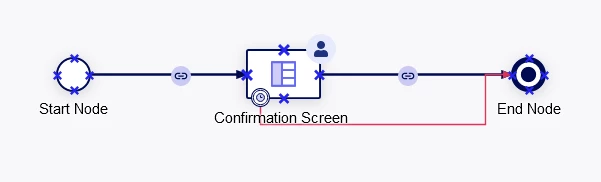
Second one:
Make the form return something when clicking a button, and continue after the output.
The problem is that I want the process to run even when the user navigates away
from the screen, or closes the tab, as to account for the user not clicking the button.

The two approaches can be used simultaneously, but still I would rather not wait for
neither user, nor the timer. I just want it to go to the end node immediately.

Is there another approach that I could use?

10 replies

mikes0011
Brainy
March 19, 2024

This is my approach:

Launch the "confirmation screen" in a quasi-asynchronous way, and continue the process immediately.  Give no buttons on the form, and force the user to navigate away (potentially explaining this to them on the form), and/or give them a link to click back to their Site (now that a!safeLink can open in same tab, and with more flexible Site URL options, this is more doable now than it was in the past).

Edit: plus as pointed out in Stefan's blog post, you would normally want this to be configured as a Quick Task, which these days only means it won't show up in a user's task list.

sebastiand8415
March 20, 2024

This configuration doesn't seem to work. The process enters the node with confitmation screen, but it is not displayed in the UI.

mikes0011
Brainy
March 20, 2024

You will need to make sure chaining is correct.  It should chain all the way up to the user input task (and not along the other output from the AND gateway).  If you'd like to post a screenshot of your process flow here I can double check it for you.