

raulg0001
Inspiring
March 31, 2022
Solved

Send message

  • March 31, 2022
  • 5 replies
  • 0 views

Hello ,

I am confused with the sending of messages. I want to send a message to a specific instance, I don't want to send a message to all instances of a process model. The only way I found is creating a condition in which I evaluate if the instance that I pass as a parameter is the instance that I want to receive the message.

For me this is not very efficient because all active instances will evaluate that condition to determine if the message is equal to the current instance.
Best answer by stefanhelzle0001

You can directly target a specific instance.

docs.appian.com/.../Messaging_Best_Practices.html

5 replies

stefanhelzle0001
Brainy
March 31, 2022

You can directly target a specific instance.

docs.appian.com/.../Messaging_Best_Practices.html

stewart.burchell
March 31, 2022

So whilst you have to configure a "listener" (receive message) in the process model (so that all instances can receive a message) you can send a message to a specific instance. You do this by determining the target ProcessId. In order to get the instance ProcessId you need to create a process Report, and your process that sends the message needs to have a value that is unique to your target process instance that is visible to the process report - e.g. a unique business value.

mikes0011
Brainy
March 31, 2022

AFAIK the process instance ID is set in the "DestinationProcessID" parameter.

Unfortunately the node's configuration labels are a little vague on this aspect, but the official appian documentation is a little more clear:

The Expression Guru
raulg0001
raulg0001Author
Inspiring
March 31, 2022

Thanks ,

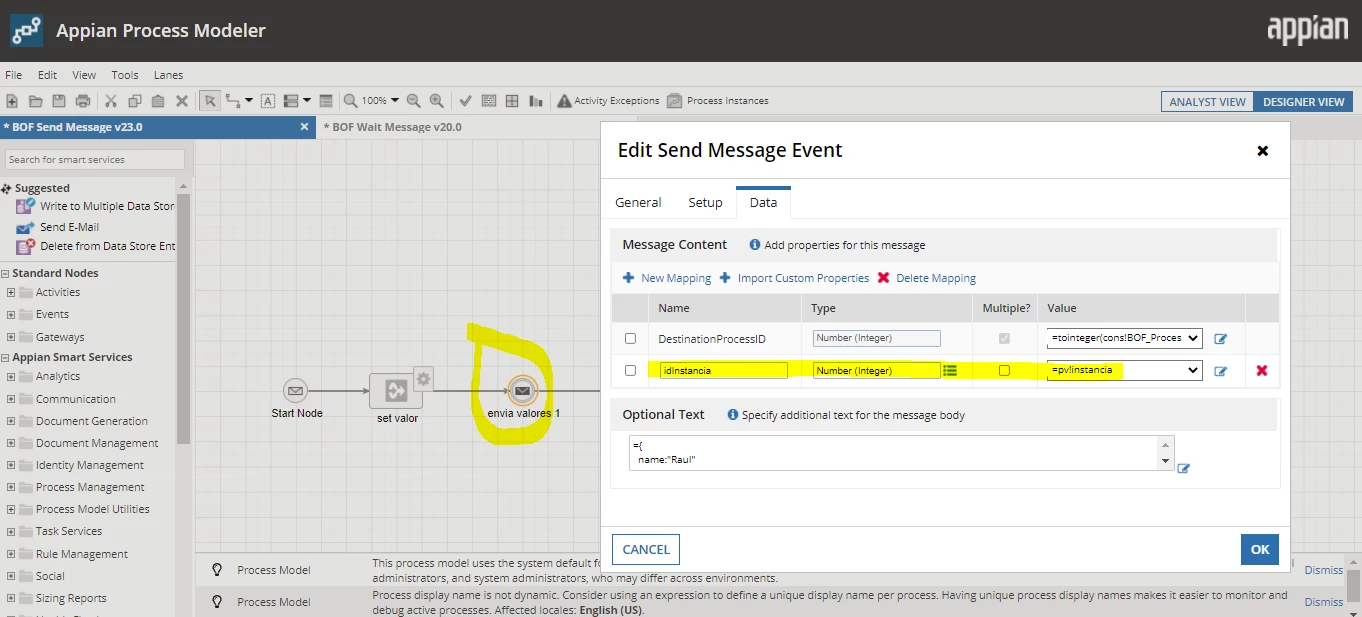
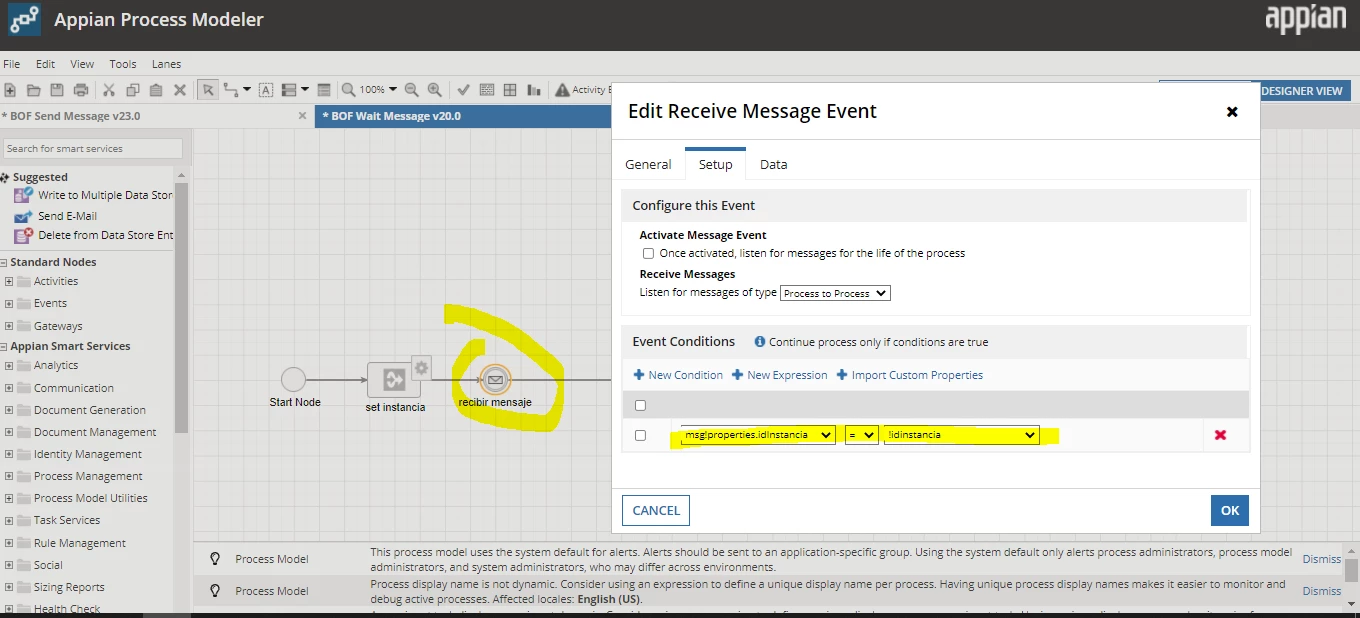
I already managed to send a message to a specific process, but now I have the need to send a message to a specific process and at the same time to a specific receive message event. Try this configuration and what happens is that the message arrives to all active instances and to all receive message events.

Any ideas ?

Config Send Event:

Result : 

mikes0011
Brainy
March 31, 2022

The documentation goes on to cover this case as well, just a bit further down:

Apologies as I haven't dealt with this stuff myself in a while, so I don't have any live examples (that i know of) in my environment to provide you with any additional clarification.

Edit to add: i whipped up a single-model tester for this and verified it myself.

Step 1: set a new mapping on the Send event (here named "target", it can be whatever name and type you want)

Step 2: on the Setup tab of the Receive node, create a Condition or Expression (or import the condition from "Import Custom Properties", although all this does is give you the message mapping names pre-staged, which you can do yourself eventually), and set the node condition to execute when the target is the correct value:

The Expression Guru
