
September 28, 2023
Question

Task with Status Submitted

  • September 28, 2023
  • 5 replies
  • 0 views

Hi,

we have a process with 2 tasks. When the first task has been completed, there is a subprocess that elaborate different script and, simultaneously, second task has been opened in chaining. Second task is used to preverse chaining in the process, meanwhile the activities of subprocess are on working. Until the subprocess has not been completed, if user click on submit button, task has been generated, This is simple example:
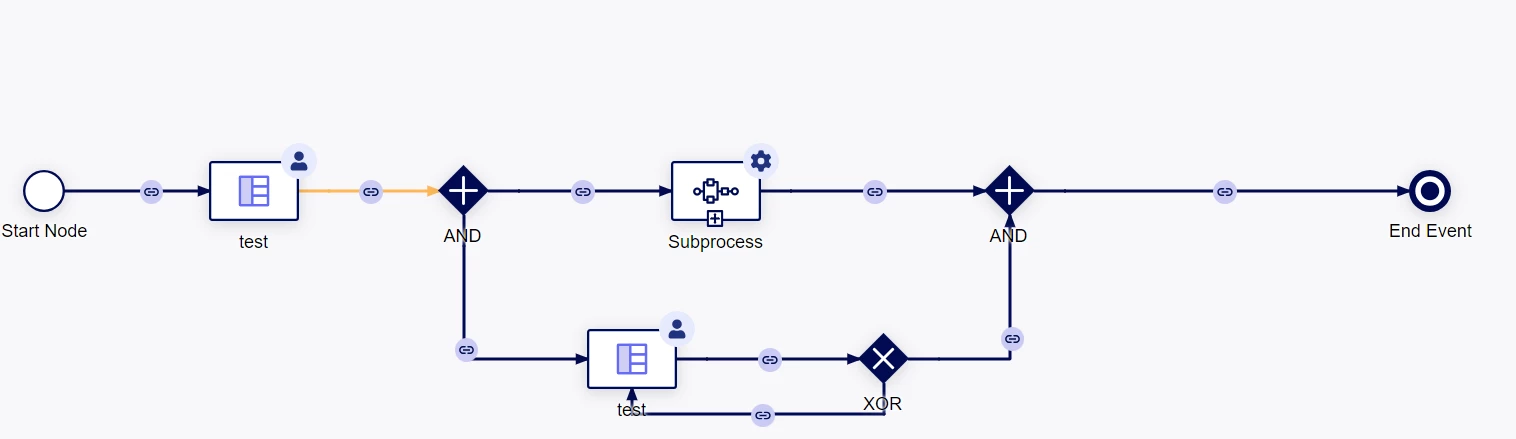
Sometimes, after completed the second task (without subprocess completed), system regenerate the task with SUBMITTED Status and user cannot retrieve it in the task list.

Do you encounter this problem? Is there a way to solve it?

Thanks in advance.

Regards,

Juri Monti

    5 replies

    mikes0011
    Brainy
    September 28, 2023
    system regenerate the task with SUBMITTED Status

    Can you clarify what you mean by this?

    September 28, 2023

    Hi Mike,

    I have no graphic example, but, after task has been completed the first time (for example) and workflow return on it, we expected that the second instance of the same task  is in ACCEPTED Status (for chaining enable), but, sometimes, appears SUBMITTED and assignment is empty. 

    In task report, it's no possible to show tasks in that status. So, user lose it and we have to cancel the instance and restart the node. In this way, user can complete it, but we have to find a solution once for all.

    Thanks

    Regards,

    Juri Monti

    mikes0011
    Brainy
    September 28, 2023

    If you're saying the user submits the "waiting" task and it should be chaining back on itself (subprocess not done yet etc), and - what, it's dropping them back to their task list / site / etc?  I'm still a little unclear what you're saying is happening from the user perspective. 

    I have a similar "waiting on completion" looping-task construct in a few of my processes and I've never been able to break it, even while rapidly spamming the "re-try" button in the task.  If you have a screenshot or something of the particular issue you're ending up with, that might help.