
March 23, 2021
Solved

Timer Event Execute each month last work day of the current month.

  • March 23, 2021
  • 3 replies
  • 1 view

Hello, 

I have a question about the timer functionality. 

What I need is a recurring process automatically to execute. Each Month. Each day 30 of each each month. or Each last work day in the month. Configured the way it is in the screenshot is not working. 

Two questions occurs here. If I don't need the Delay option how this should be configured ? In this case all I need is the process to execute at certain time. Second is Selecting Time recurrence will that guarantees that the process will automatically execute , and it will repeat each month on day 30 or each last work day of the current month ?

Thank you.
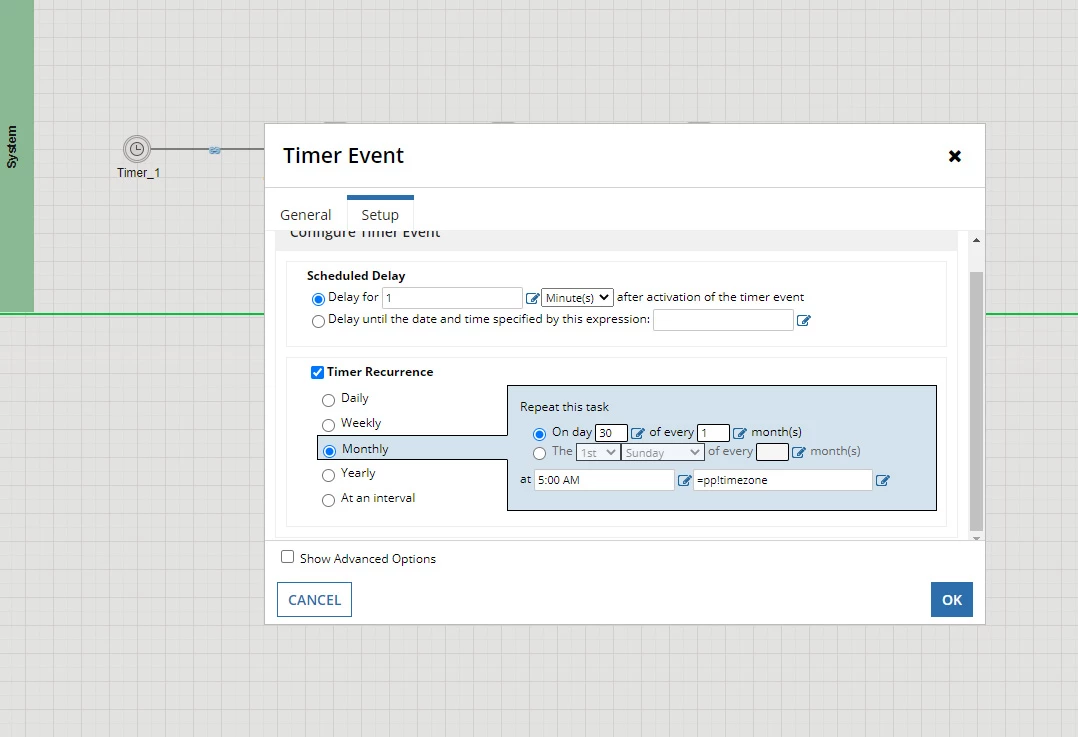
    Best answer by stefanhelzle0001

    There is no way to tell the timer event to trigger last work day in a month. I would configure it to trigger every day and have a logic node in process to determine whether to continue in process or just stop.

    3 replies

    stefanhelzle0001
    Brainy
    March 23, 2021

    There is no way to tell the timer event to trigger last work day in a month. I would configure it to trigger every day and have a logic node in process to determine whether to continue in process or just stop.

    March 23, 2021

    Hi Vladimir,
    A) There might be a possibility to get the trigger working at the last day of a month:

    Check the box 'Show Advanced Options' - there you can add an expression. e.g. like the below which will be true at the last day of the month
    day(today()) = daysinmonth(month(today()), year(today())

    To get this going instead with the last workday - you have to introduce a company specific calendar and use it in the expression

    B) To get the timer started with no delay, just put 0 minutes into the field.

    I hope that makes sense. 

    mikes0011
    Brainy
    March 23, 2021

    I also suggest checking out the "eomonth()" function, which I didn't know about until fairly recently.  That takes a date and returns the date for the end of the month that the initial date is in (as well as a "number of months" offset so you could get other things like the end of the previous month or next month, etc).

    In that case the code would look something like this:

    today() = eomonth(today(), 0)

    The Expression Guru
