
April 25, 2026
Solved

unable to create multiple exception flows in User Input Task in Process Model

  • April 25, 2026
  • 1 reply
  • 0 views

I want o create two different exception paths for user input task one with timer and another one with recieve message each will go to different flow. I am using appian version 26.3 i am unable to do it as i am getting only one flow out of user input task exception. Can any one help me regarding it.

If i use recieve message exception and timer symbol is changing to Home icon
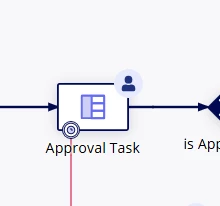

If i Use only message it is showing at the same place and i am unable to move the symbols as well

Best answer by shubhama926776

You cannot create multiple exception flows from a single User Input Task it strictly allows only one exception flow per activity node.
Any events configured within the task (Timer, Message, or Rule) will all trigger that same single path.
Workaround you could try ->
Wrap your UIT in a Sub-process. In the parent process, place a Timer event and a Receive Message event in parallel to that sub-process. Configure these events to cancel the sub-process node when they trigger, allowing each to lead into its own unique flow. 

1 reply

shubhama926776
April 27, 2026

You cannot create multiple exception flows from a single User Input Task it strictly allows only one exception flow per activity node.
Any events configured within the task (Timer, Message, or Rule) will all trigger that same single path.
Workaround you could try ->
Wrap your UIT in a Sub-process. In the parent process, place a Timer event and a Receive Message event in parallel to that sub-process. Configure these events to cancel the sub-process node when they trigger, allowing each to lead into its own unique flow.