
September 27, 2024
Question

Using Process Variable in a Query Database From Integration

  • September 27, 2024
  • 6 replies
  • 0 views

I have an integration that I save the output into a DataSubset object and want to use to update a table in the database with a Query Database task.
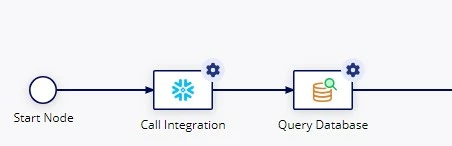
The DataSubset is as followed:

DataSubset
    startindex null
    ...
    data [List of Dictionary - 1,000 items]
        Dictionary
            EMPLOYEE_ID "1"
            PAY "Hourly"
        ...

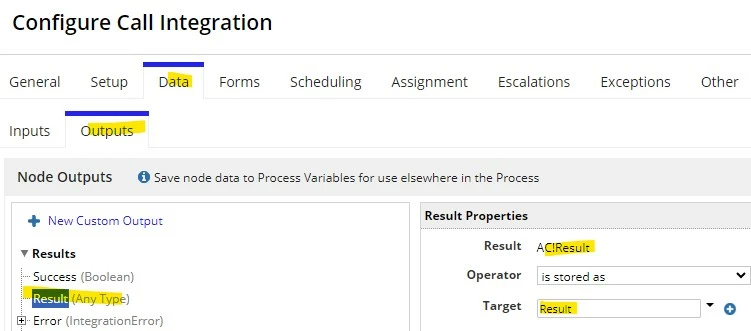
In my Integration task, which is the first task, I save the output to a Result variable (which is type of DataSubset).
Now in the next task, I add a Query Database task that I want to use to update a table where the EMPLOYEE_IDs match
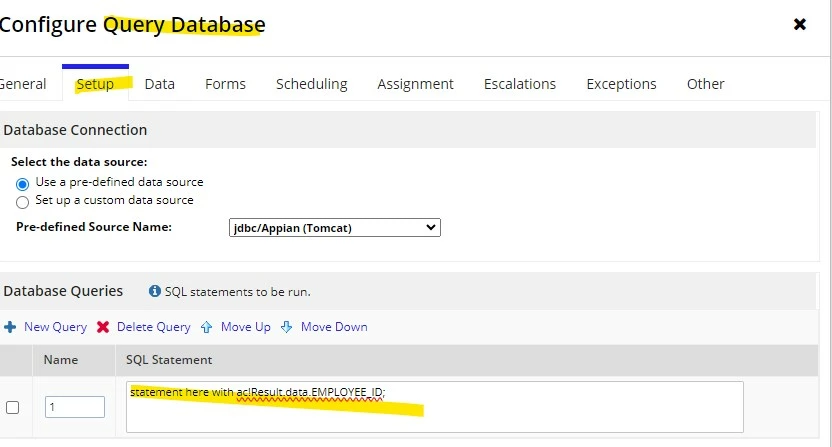
Would it be: "Update users set pay = ac!Result.data.PAY where employee_id = ac!Result.data.EMPLOYEE_ID;"?

This doesn't seem to work. What am I doing wrong or what's the right way?

6 replies

kumara0180
September 27, 2024

Why can’t you use https://docs.appian.com/suite/help/24.3/Write_to_Data_Store_Entity_Smart_Service.html or writeToRecords Smart services. 
they update the row of you have primary key passed in the parameters for the row.

alexl0007Author
September 30, 2024

Hello, the query I add as seen in the "Query Database" task does not work, it gives me an error. That's my question, what is the appropriate way to use a List used in the previous task from calling an integration.

kumara0180
September 30, 2024

Try using  write to data store entity smart service 

stefanhelzle0001
September 28, 2024
This doesn't seem to work

This does not provide much details we could somehow try to guess what the issue might be. Can you shed some light on this?

alexl0007Author
September 30, 2024

Hi Stefan, what doesn't work is the query I added in the SQL Statement as "UPDATE pay from users where employee_id
= ac!Result.data.employee_id;"