shobhits6437
March 19, 2024
Solved

can we have dynamic label for columns in Appian record type

  • March 19, 2024
  • 4 replies
  • 0 views

can we have dynamic label for columns in appian record type.

For Ex. For current year, it should display 2023, for next year it should display 2024 and so on. Is it possible to have this implementation done?

    Best answer by konduruc733182

    Hello [mention:53e48f16520a4945abafe976e4388337:e9ed411860ed4f2ba0265705b8793d05]  

    Yes it can be done. If you want to see this happen when you drag and drop a readOnly grid and select a particular record type it can be done. Update the grid column labels in the Edit Record List from the RecordType object>Interfaces>List>Edit List. (This is on the tempo level as well)
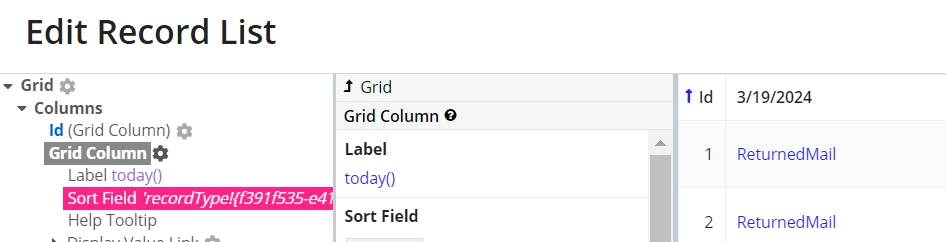
    >> Here I have used today you can format it to the Year.

    if you are manually creating a readOnly or Editable grid then yes the same way but at your interface level using the label parameter of the grid column or the gridLayoutHeaderCell label respectively.

    But as Stefan asked, Why? What is it the purpose.

    4 replies

    stefanhelzle0001
    Brainy
    March 19, 2024

    I am not sure what exactly you mean. Is your question about grids in interfaces?

    BTW, I do not really understand the purpose of this !?!?! Can you help me?

    shobhits6437
    March 19, 2024

    Hi Stefan, Thanks for your reply. Yes, this is regarding the Cloumn Label for grids in interfaces.

    konduruc733182
    March 19, 2024

    Hello [mention:53e48f16520a4945abafe976e4388337:e9ed411860ed4f2ba0265705b8793d05]  

    Yes it can be done. If you want to see this happen when you drag and drop a readOnly grid and select a particular record type it can be done. Update the grid column labels in the Edit Record List from the RecordType object>Interfaces>List>Edit List. (This is on the tempo level as well)

    >> Here I have used today you can format it to the Year.

    if you are manually creating a readOnly or Editable grid then yes the same way but at your interface level using the label parameter of the grid column or the gridLayoutHeaderCell label respectively.

    But as Stefan asked, Why? What is it the purpose.

    shobhits6437
    March 19, 2024

    Hi Chaitanya, Thanks for the reply. It worked.
