

andrzejh0002
March 10, 2023
Solved

Data Store Issue Appian 22.4, More than one table found in namespace (, )

  • March 10, 2023
  • 3 replies
  • 1 view

Hi All,

We have an issue while trying to publish the Data Store.

Couple of points to give you a background:

  • Appian User is not assigned with proper Default DB Schema - the schema where all of the tables and views are held - (Therefore we're using Synonyms)
  • After upgrade to Appian 22.4 we're unable to Verify / Publish the data store

We have found the workaround by adding schema  annotation to all CDT XSD <xsd:appinfo source="appian.jpa">@Table(name="TABLENAME", schema="SCHEMA").

This workaround fails however when the CDT in question has 'primitive array'. In such case Appian creates a related table for the 'array' field.
Because those tables were created in another schema we now cannot publish the entire Data Store.
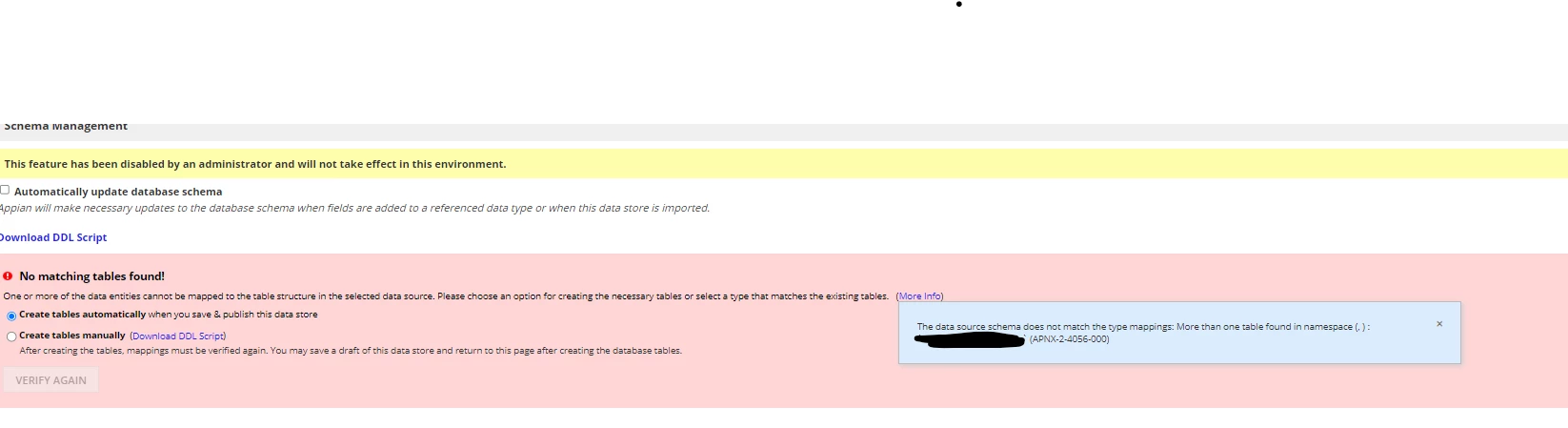
We have multiple such tables, therefore we would appreciate any help (Other than changing the default schema - which is currently not an option in our business case).

Can you please advise if you have a solution for that issue?

Thanks,

Andrzej

Best answer by stefanhelzle0001

That's a problem after Appian introduced direct support for synonyms. This leads to situations where Appian "sees" the table and its synonym and then throws this error message. I think you will have to solve this on the DB side. Maybe by renaming the table, while keeping the synonym.

3 replies

srinivast0001
March 13, 2023

Hi,

This is more like Database issue, can you take the backup of your schema, and recreate it again and then verify/publish the datastore. 

stefanhelzle0001
Brainy
March 13, 2023

That's a problem after Appian introduced direct support for synonyms. This leads to situations where Appian "sees" the table and its synonym and then throws this error message. I think you will have to solve this on the DB side. Maybe by renaming the table, while keeping the synonym.

andrzejh0002
March 14, 2023

Thanks a lot [mention:126a676c85024855948336691b0a7b92:e9ed411860ed4f2ba0265705b8793d05]. We're considering that however changing the names of the tables may impact db views that refer those tables... but we'll figure it out.

Thanks a lot for suggestion.

Interesting note is that if the default schema is properly set for the user (the schema that carries all the actual objects) even with public synonyms of the same name Appian 22.4 ignores that :)