

sivanagamalleswarit0003
July 13, 2022
Solved

Data Store publishing error

  • July 13, 2022
  • 3 replies
  • 0 views

Hello there,

I created a view and CDT on top it. Data store is failing to verify and Publish the new entity.

Below is the received error:
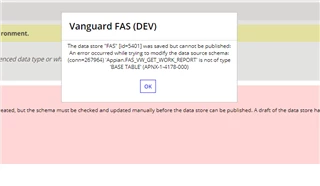
 Added XSD for reference


      @Table(name="FAS_VW_GET_WORK_REPORT")


          @Column(name="COUNT", columnDefinition="INT")


          @Column(name="USERNAME", columnDefinition="VARCHAR(500)")


          @Column(name="ACTION", columnDefinition="VARCHAR(255)")


          @Column(name="DATETIME", columnDefinition="DATETIME")


          @Column(name="CASE_ID", columnDefinition="INT")


          @Column(name="CLIENT_TYPE", columnDefinition="VARCHAR(255)")


          @Column(name="TRANSACTION_TYPE", columnDefinition="VARCHAR(255)")


          @Column(name="TRANSACTION_SUB_TYPE", columnDefinition="VARCHAR(255)")


          @Column(name="TASK", columnDefinition="VARCHAR(255)")


          @Column(name="CASE_STATUS", columnDefinition="VARCHAR(255)")


          @Column(name="CREATED_BY", columnDefinition="VARCHAR(255)")


          @Column(name="CREATED_DATE_TIME", columnDefinition="DATETIME")


          @Column(name="UPDATED_BY", columnDefinition="VARCHAR(255)")


          @Column(name="UPDATED_DATE_TIME", columnDefinition="DATETIME")


Please suggest!!

Also DDL is asking to update this view which is not appropriate: DDL below

/* UPDATE DDL */
alter table `FAS_VW_GET_WORK_REPORT`
add column a_id bigint not null;

    Best answer by stefanhelzle0001

    Appian requires that each CDT has a unique key. If you do not provide a key, it tries to create a field named "a_id". Modify the CDT and make a unique field the primary key.

    3 replies

    stefanhelzle0001
    Brainy
    July 13, 2022

    Appian requires that each CDT has a unique key. If you do not provide a key, it tries to create a field named "a_id". Modify the CDT and make a unique field the primary key.

    csteward
    July 13, 2022

    Such as, your CASE_ID field (if it is unique):


              @Id @Column(name="CASE_ID", columnDefinition="INT NOT NULL")


    Otherwise you can add a new unique row to your view with something such as (example from MSSQL):

    
    SELECT TOP (100) PERCENT ROW_NUMBER() OVER (ORDER BY id DESC) AS [Row],
    [status],
    [step],
    [requestNumber]
    from tblCOE_SAMPLE_TABLE

    Additionally, typically for such calculated columns in views we will have to define as BIGINT in the CDT:


              @Id @Column(columnDefinition="BIGINT NOT NULL")


    sivanagamalleswarit0003
    July 13, 2022

    Hello Chris, thanks for quick response and i updated with Primary Key as needed. 

    Thank you