May 15, 2024
Question

Defining Case Visibility for loggedinuser()

  • May 15, 2024
  • 15 replies
  • 0 views

We have a requirement to see the cases on dashboard based on some criteria.  This criteria is defined in a table called user access details. Details of all the cases are present in one record.

How can we apply these user access details values as filters inside another record to get the values??

Note: For a single user, there can be multiple user access details, so there will be multiple rows. Each row need to be applied as filter to the record.

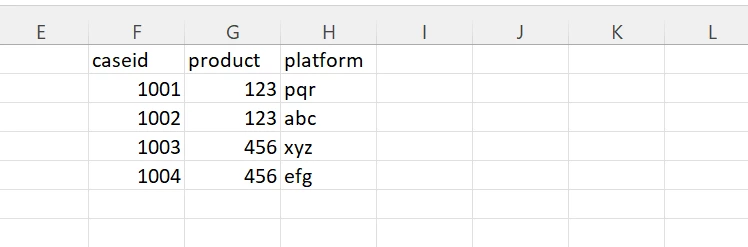
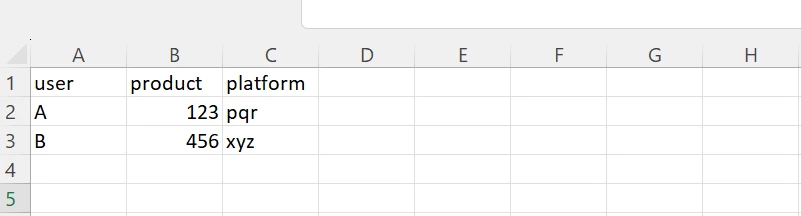
Screenshots have been added for reference. First image refers to user access details, second one refers to data table

When User A logs into Appian, they should see only caseid 1001, when user B logs in they should see only case 1003. How can we achieve this using Records??
We already tried using record level security, but here we can define only static values. But, in our scenario we need to define dynamic values which will be varied on logged in user.

15 replies

stefanhelzle0001
Brainy
May 15, 2024

Please read my blog post. If I understand your use case correctly, this should be a good fit.

https://appian.rocks/2022/08/15/strict-security-with-synchronized-records/

May 15, 2024

Hi [mention:a11f77a729fb4db2af76b09948583328:e9ed411860ed4f2ba0265705b8793d05] ,

In our scenario, user is not only the foreign key. User and CaseType are the foreign keys where the user will be a Group at the initial stage and any one person from the group can pick the task and progress on it. Can this be achieved using above approach?

stefanhelzle0001
Brainy
May 15, 2024

I have a hard time following your description.

The basic idea, is to define permission on the access record, using security rules. Then, just have the case record inherit from the access record. If you can describe your requirements using security rules, it should just work.

shubhama926776
Brainy
May 15, 2024

On the interface, based on the logged-in user, pull data from the User Access Details table. Store this data in a local variable.
Loop through each row in the local variable and query the Cases data table for each row using queryFilter on product and platform. You might get multiple entries. Flattening the output using flatten().
You can display these entries as desired.

Added sample code for your understanding
Let me know if that works for you.

a!localVariables(
  local!userAccessDetails: /*Pull data from user access detail here(Multiple Entries for loggedIn User)*/
a!flatten(  a!forEach(
    items: local!userAccessDetails,
    expression: a!queryRecordType(
      recordType: {},
      filters: {
        a!queryFilter(
          field: "product",
          operator: "=",
          value: index(local!userAccessDetails, "product", {})
        ),
        a!queryFilter(
          field: "platform",
          operator: "=",
          value: index(local!userAccessDetails, "platform", {})
        )
      },
      
    )
  )
  )
)

शुभम्
May 15, 2024

[mention:dea33493db6342c9a73dc108d45120c0:e9ed411860ed4f2ba0265705b8793d05]   We already tried this approach, but record is not accepting rule! functions

shubhama926776
Brainy
May 15, 2024

Can you share your code snippet for same or Steps you performed?

शुभम्