gautams4173
January 3, 2023
Solved

Dynamic User FIlter

  • January 3, 2023
  • 2 replies
  • 0 views

Hi all,

I am trying to create a user filter wherein the option labels will come dynamically from an expression rule. I am not quite sure how to achieve this. Does anyone know how to do this ? 

Best answer by konduruc733182

Hello gautams4173,

You can create using the expression in the User Filters.

Search and User Filters>New User Filter>Expression> use the a!recordFilterList() and create your list dynamically.

If you are having your community instance, you can check the Acme Solutions Application.
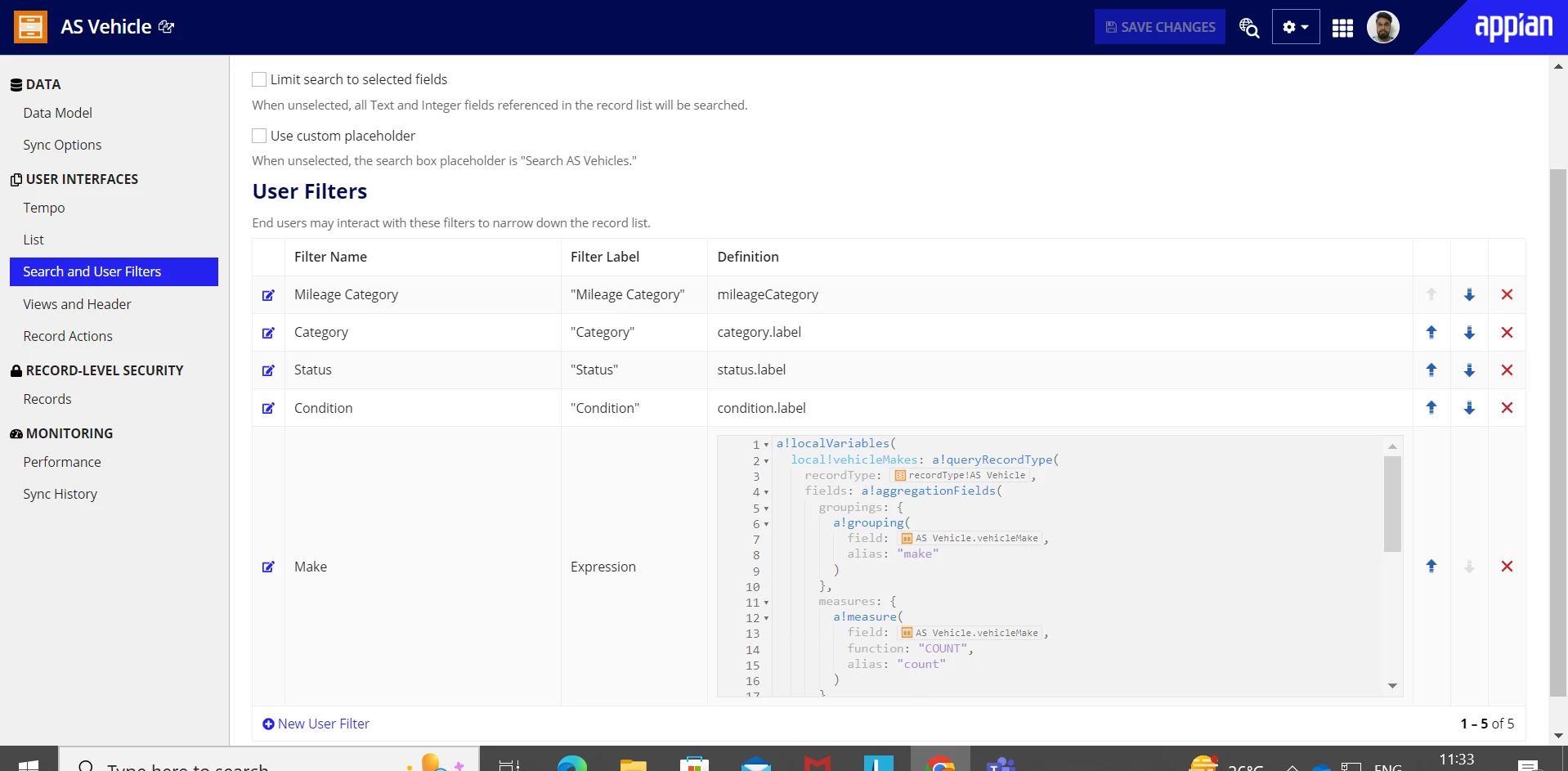
a!localVariables(
  local!vehicleMakes: a!queryRecordType(
    recordType: 'recordType!{5f29c334-b8fd-43d7-aaf3-a50d45b1e0da}AS Vehicle',
    fields: a!aggregationFields(
      groupings: {
        a!grouping(
          field: 'recordType!{5f29c334-b8fd-43d7-aaf3-a50d45b1e0da}AS Vehicle.fields.{011784c1-a547-4989-9af1-e6039f6b9d2a}vehicleMake',
          alias: "make"
        )
      },
      measures: {
        a!measure(
          field: 'recordType!{5f29c334-b8fd-43d7-aaf3-a50d45b1e0da}AS Vehicle.fields.{011784c1-a547-4989-9af1-e6039f6b9d2a}vehicleMake',
          function: "COUNT",
          alias: "count"
        )
      }
    ),
    pagingInfo: a!pagingInfo(startIndex: 1, batchSize: 5000)
  ),
  a!recordFilterList(
    name: "Make",
    options: a!forEach(
      items: local!vehicleMakes.data,
      expression: a!recordFilterListOption(
        id: fv!index,
        name: fv!item.make,
        filter: a!queryFilter(
          field: 'recordType!{5f29c334-b8fd-43d7-aaf3-a50d45b1e0da}AS Vehicle.fields.{011784c1-a547-4989-9af1-e6039f6b9d2a}vehicleMake',
          operator: "=",
          value: fv!item.make
        ),
        dataCount: fv!item.count
      )
    )
  )
)

Please change accordingly.

Hope this will help you.

2 replies

konduruc733182
January 3, 2023

Hello gautams4173,

You can create using the expression in the User Filters.

Search and User Filters>New User Filter>Expression> use the a!recordFilterList() and create your list dynamically.

If you are having your community instance, you can check the Acme Solutions Application.

a!localVariables(
  local!vehicleMakes: a!queryRecordType(
    recordType: 'recordType!{5f29c334-b8fd-43d7-aaf3-a50d45b1e0da}AS Vehicle',
    fields: a!aggregationFields(
      groupings: {
        a!grouping(
          field: 'recordType!{5f29c334-b8fd-43d7-aaf3-a50d45b1e0da}AS Vehicle.fields.{011784c1-a547-4989-9af1-e6039f6b9d2a}vehicleMake',
          alias: "make"
        )
      },
      measures: {
        a!measure(
          field: 'recordType!{5f29c334-b8fd-43d7-aaf3-a50d45b1e0da}AS Vehicle.fields.{011784c1-a547-4989-9af1-e6039f6b9d2a}vehicleMake',
          function: "COUNT",
          alias: "count"
        )
      }
    ),
    pagingInfo: a!pagingInfo(startIndex: 1, batchSize: 5000)
  ),
  a!recordFilterList(
    name: "Make",
    options: a!forEach(
      items: local!vehicleMakes.data,
      expression: a!recordFilterListOption(
        id: fv!index,
        name: fv!item.make,
        filter: a!queryFilter(
          field: 'recordType!{5f29c334-b8fd-43d7-aaf3-a50d45b1e0da}AS Vehicle.fields.{011784c1-a547-4989-9af1-e6039f6b9d2a}vehicleMake',
          operator: "=",
          value: fv!item.make
        ),
        dataCount: fv!item.count
      )
    )
  )
)

Please change accordingly.

Hope this will help you.

gautams4173
January 3, 2023

Thank you, It worked :)
