

floriang0001
April 20, 2021
Solved

Dynamically linking in a record grid to other record types in Tempo?

  • April 20, 2021
  • 3 replies
  • 0 views

I have configured a record type which displays me something like the following on the records tab in Tempo
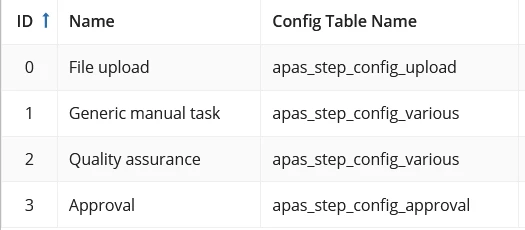
I now would like have links in the 3rd column to corresponding records. Here, the "apas_step_config_..." are actually DB table names. I already created constants pointing to the corresponding entities in my data store objects of that specific DB. Also, I created record types for all possible appearing config table names. But how do I configure my display value here?

What I can think of is that I introduce another column in the database which contains the URL of the corresponding record page on tempo, but that seems to hard-coded?

I would appreciate any guidance.

Best answer by mikes0011

Appian doesn't have any (supported) way of taking text like your table name as an input and directly calling a constant by that name.

What I was imagining you'd do here is either write an if() expression that manually tests the table name and returns the matching DSE constant.  In this case I'd set up a special expression rule just to handle that switching logic, then call that in the parent rules or interfaces where it comes into play.

3 replies

mikes0011
Brainy
April 20, 2021

Create an expression rule or interface object that takes as parameters the "config table name", the primary key id of the row you're looking at, and anything else relevant, and then evaluates internally to determine what to pass back.  You can have it pass back an a!recordLink object configured pretty much however you want (or even an a!richTextDisplayField() component pre-configured with the link you need).  Then in your record type column definition, simply call the rule/interface you'd set up, passing in the relevant details.

The Expression Guru
floriang0001
April 21, 2021

Your tip allowed me to make some progress, but I am not there yet. As suggested, I created an expression rule which gives me for a given database all rows of that config table I am interested in:

a!queryEntity(
  entity: cons!APAS_STEP_CONFIG_APPROVAL,
  query: a!query(
    logicalExpression: a!queryLogicalExpression(
      operator: "AND",
      filters: {
        a!queryFilter(
          field: "stepId",
          operator: "=",
          value: ri!StepId
        )
      },
      ignoreFiltersWithEmptyValues: true
    ),
    pagingInfo: a!pagingInfo(
      startIndex: 1,
      batchSize: -1
    )
  ),
  fetchTotalCount: false
)

This code is not yet dynamic and works only for the last line in the table shown in my original question.

My challenge: Based on the input rule configTableName of my newly defined rule expression, I should dynamically choose the entity constant. In other programming language I would do something like cons!`ri!configTableName` where the backticks ensure that I will get the value of ri!configTab and (probably equivalent to the extract()-function)

I would appreciate if you could again help me out further here, please.

mikes0011
mikes0011Answer
Brainy
April 21, 2021

Appian doesn't have any (supported) way of taking text like your table name as an input and directly calling a constant by that name.

What I was imagining you'd do here is either write an if() expression that manually tests the table name and returns the matching DSE constant.  In this case I'd set up a special expression rule just to handle that switching logic, then call that in the parent rules or interfaces where it comes into play.

The Expression Guru