
July 23, 2021
Solved

Error in Record sorting

  • July 23, 2021
  • 15 replies
  • 0 views

Hi all,

I am using a view as the data source for an entity-backed record.  I have a field "Student Full Name" in the view, which I am getting by concatenating "Student First Name" and "Candidate Last Name" using the function concat("studLastNm", ", ", "studFirstNm").

So, for example, in the view and record the student full name will be displayed as "Brewer, Allan".  There are no null or empty values in "Student Last Name".  My CDT for view has primary key.  When I sort the view for "Student Full Name" in the cloud database, the values are getting sorted properly.  But the same in the record gives the following error:

The alias [[field=STUDENT_FULL_NM, ascending=true]] cannot be used because it contains illegal characters. The alias must contain only letters, numbers, and underscores, and must start with a letter. (APNX-1-4203-009)
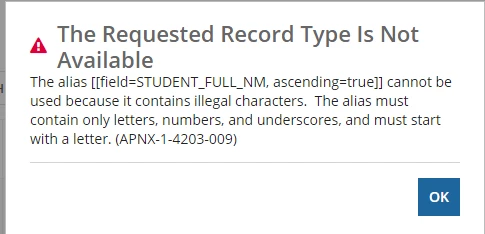
Does the record sorting not work when the field has commas?  

Can someone help me to fix this issue?  Thanks.

    Best answer by vimals

    @brindas,

    Can you share the initial sort configuration you have for the Grid in Record Types and also sort configuration of the grid column "Student Full Name"?

    It seems like you might have used rf!STUDENT_FULL_NM  or something similar to that instead of just "STUDENT_FULL_NM "

    15 replies

    stefanhelzle0001
    Brainy
    July 23, 2021

    I think the issue is that the alias for the concat is "Student Full Name". Appian does not support field names containing spaces. Changing this to e.g. "Student_Full_Name" should do it.

    brindasAuthor
    July 23, 2021

    But my field name in the view and CDT is STUDENT_FULL_NM Stefan

    stefanhelzle0001
    Brainy
    July 23, 2021

    OK. What is your queryEntity code?

    stewart.burchell
    July 23, 2021

    Where exactly are you implementing your sort on this field? Is it in an Interface object? If so, please provide the code for that Interface.

    brindasAuthor
    July 23, 2021

    I have created the recordtype from the view as the data source.  The record list field is giving error while sorting

    vimals
    vimalsAnswer
    July 23, 2021

    @brindas,

    Can you share the initial sort configuration you have for the Grid in Record Types and also sort configuration of the grid column "Student Full Name"?

    It seems like you might have used rf!STUDENT_FULL_NM  or something similar to that instead of just "STUDENT_FULL_NM "

    stefanhelzle0001
    Brainy
    July 24, 2021

    I have the same idea. Please check that.

    brindasAuthor
    July 25, 2021

    Thank you Stefan.  It is working now.