
August 10, 2021
Solved

Error verifying datastore

  • August 10, 2021
  • 12 replies
  • 0 views

Hi,

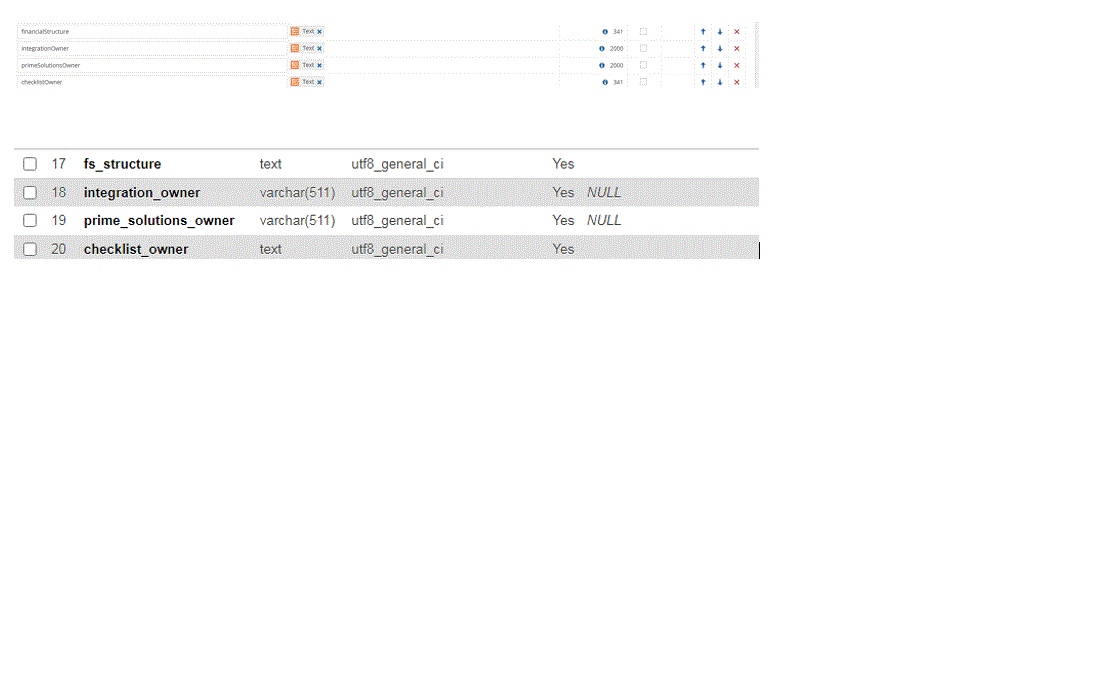
I made changes to the View (added a column to the view with datatype = text). Added the same definition to the CDT by adding new column with datatype=text.

When i try to verify the datastore, it is giving me the below error

The data source schema does not match the type mappings: Wrong column type in Appian.p_my_view for column fs_structure. Found: text, expected: VARCHAR(341) (APNX-2-4056-000). see below for CDT definition and view definition. There are other column exists in the view with text and it doesnt complain.

any help is appreciated.
    Best answer by ramkumars0001

    [mention:663f61f687054c48a8709b34ca84fcaf:e9ed411860ed4f2ba0265705b8793d05] , [mention:a0ec3db366444da2aefc9d100e75b1ed:e9ed411860ed4f2ba0265705b8793d05], [mention:6b9f80ff18f9420082d13ef2d5121d56:e9ed411860ed4f2ba0265705b8793d05],  [mention:b600a894dff644aabc8ebe492c4b6968:e9ed411860ed4f2ba0265705b8793d05]

    I had to change my view and cast my text columns into varchar and it fixed the problem. 

    Many thanks for your time and assistance. Have a great day to you all!

    12 replies

    acaciob0002
    August 11, 2021

    Hi there,

    Could you check the XSD for the View CDT and see if you have something similar to the code below:


    	  @Column(name="fs_structure", nullable=true, columnDefinition="VARCHAR(341)")


    I'm not sure if you already tried that, but maybe you just need to download and edit the XSD and create a new version of the CDT.

    Regards,

    Acacio B.

    August 12, 2021

    hi [mention:663f61f687054c48a8709b34ca84fcaf:e9ed411860ed4f2ba0265705b8793d05] Thank you so much for your help. I already tried creating new version from XSD. It still complains

    I also tried the solution suggested [mention:a0ec3db366444da2aefc9d100e75b1ed:e9ed411860ed4f2ba0265705b8793d05] below and it still complains the same.

    Our DB was migrated from MySQL to MariaDB. Not sure if this is the root causee.

    Thank you so much for your time and  attention! You are awesome!. Have  a great day

    selvakumark
    August 11, 2021

    Hi [mention:9ad08bf383874fe99706045f9edea0ae:e9ed411860ed4f2ba0265705b8793d05],

    The data store throws an error because the column data type in the view is different than what you've defined in the XSD. To overcome this you should either:

    1. If that column is for sure going to capture text values, then change the columnDefinition in your XSD file to below:
      
      	
      	  @Column(name="fs_structure", nullable=true, columnDefinition="TEXT")
      	
      
    2. If that column doesn't need to be a text type, you can typecast the column in your view to the defined format.

    Also, I could see that all the columns have different definitions in Appian and in the database. Kindly ensure that the data type that you mention in the XSD is the same as the one in the database.

    August 12, 2021

    hi [mention:a0ec3db366444da2aefc9d100e75b1ed:e9ed411860ed4f2ba0265705b8793d05] I tried your solution and it still complains.

    Our DB was migrated from MySQL to MariaDB. Not sure if this is the root causee.

    Thank you so much for your time and  attention! You are awesome!. Have  a great day

    peter.lewis
    Employee
    August 12, 2021

    The easiest way to find the correct syntax you need is to generate a new CDT directly from the database view. You won't actually need the CDT later (and can plan to delete it once you're done), but that should tell you what syntax is needed to connect to that field if you then download the XSD of this new CDT. Then, just copy the element from this new CDT into your old CDT XSD and re-upload, and you should be good to go!

    August 13, 2021

    For what DB the system is connecting to, check your admin console and the Appian-ds file.

    You should also check synonyms and roles that you are connecting as and to. They may be connecting to the correctly indicated schema, but not looking at the object you think.

    Regards, 

    Woodyman

    Reach back freely if ur still facing a problem

    November 14, 2022

    Generating a new CDT directly from the database view is the fastest way to discover the necessary proper syntax. Although you won't actually need the CDT in the future (and can prepare to delete it once you're done), if you download the XSD of this new CDT, it should inform you of the syntax required to connect to that field. You should then be ready to go if you simply duplicate the element from this new CDT into your old CDT XSD and re-upload.

    Regards 

    Coolnamesfinder

    Reach back freely if ur still facing a problem