
October 15, 2025
Question

Event history @ notification email

  • October 15, 2025
  • 6 replies
  • 0 views

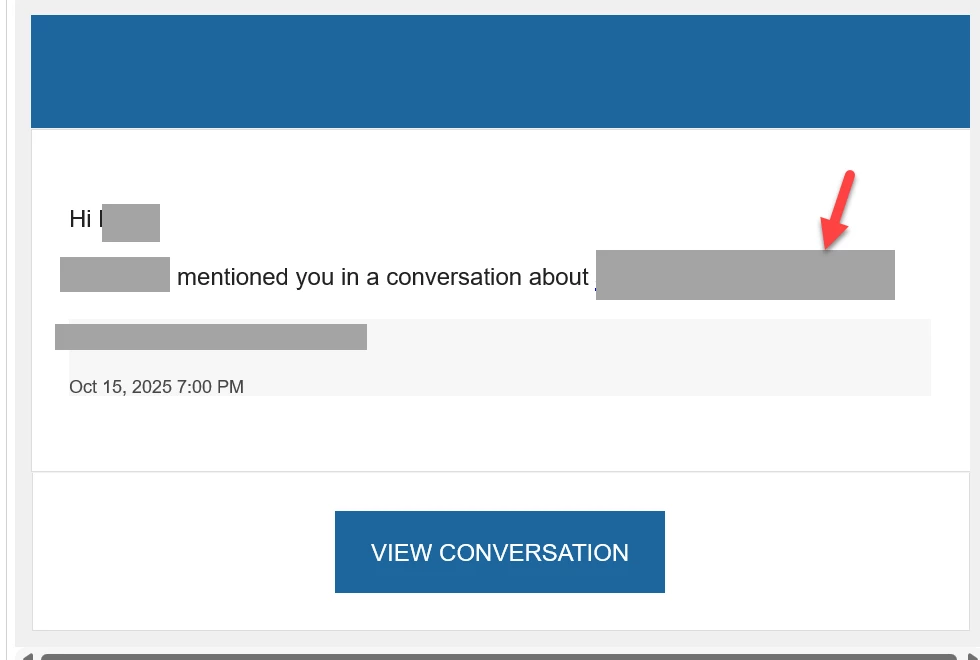
Is there any way to remove or change the text that comes from where the arrow is pointing to? Right now, it's displaying the username of the person who created the record that this event history is built off of,  which isn't accurate in context. Can it be removed so text just says "mentioned you in a conversation" or at least changed so it doesn't display the createdby, but the record ID?
6 replies

shubhama926776
October 16, 2025

No, you cannot remove or change the username in event history notifications using standard configuration.
Only a custom notification setup solution allows this.​

October 16, 2025

Do you have a custom notification setup suggestion? It seems a little odd to me that the email message is "mentioned you in a conversation about" and it's about someone's username. Can we at least change it so instead of pointing to the created by of the event record, it points to the ID of the event record?

shubhama926776
October 16, 2025

You cannot customize auto-generated @mention notification text. The "mentioned you in a conversation about [username]" format is built-in and cannot be modified.
Create a Record Event or process start event to trigger your process model when the relevant record event occurs. Use the Send E-Mail Smart Service in PM and compose your notification email(Customize the recipient, subject, and message as needed.)

harshas2775
October 16, 2025

As its an auto generated email it is not possible to configure the content of it. Better to setup custom email notifications. 

October 16, 2025

Do you have suggestions for how to utilize the @ functionality for event history with custom email notifications? Or were you referring to setting up a custom comment function?

stefanhelzle0001
October 16, 2025

If this is an important requirement, you will have to implement your custom commenting mechanism.