

tracyl
May 24, 2023
Question

Export Button in Record Grid (Long URL links in Excel file)

  • May 24, 2023
  • 10 replies
  • 0 views

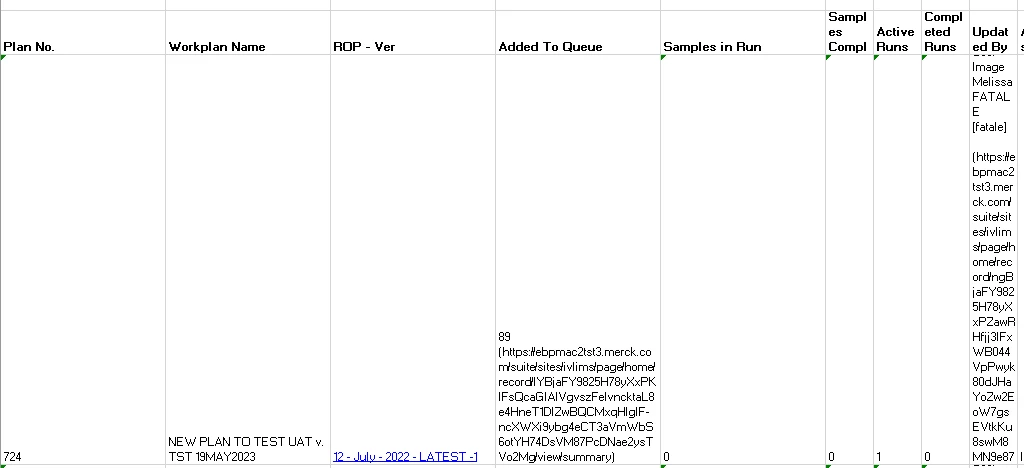
I am using the export button in a record grid field. However, when the Excel file is downloaded, some of the fields have long URL links in parentheses next to them. I am not sure how to get rid of the URL links. I think this is because one of the links is a a!recordLink() component and another link is created through a personalized expression rule. Wanted to see if anyone else had insight about this on getting the link to show as normal rather than a super long URL. I have provided a screenshot of what the Excel file looks like below. 
10 replies

May 25, 2023

I usually do not recommend enabling this feature for multiple reasons for which this can be one.

My advise would be to disable the export to excel button and instead build your own functionality for which you can completely control the Excel output itself, as well as who may access it.

tracyl
tracylAuthor
May 25, 2023

This grid is being backed by a record-type. Would it work the same way with record-backed grids and how would I begin on building out the functionality since the export button is currently automatically configured to show up next to the rest of the buttons on the record grid? 

May 25, 2023

How you have configured that grid column?

You can pass that generated link from ER in a a!safeLink() and use it an a richTextDisplayField()

a!gridColumn(
      label: "Test",
      value: a!richTextDisplayField(
        value: a!richTextItem(
          text: "Test",
          link: a!safeLink(uri: "https://www.youtube.com/")
        )
      ),
      align: "START",
      width: "AUTO"
    )

tracyl
tracylAuthor
May 25, 2023

This is great however we are currently using a!recordLink() for each row in the grid. I'm not sure if a!safeLink() can replicate that. 

harshitb6843
May 25, 2023

Please past the code snippet that you are using to configure the grid column. 

tracyl
tracylAuthor
May 25, 2023

There are two columns in the grid that are showing the long URL links:

This is the first column ("Added To Queue") which is referencing a record link 

a!gridColumn(
                        label: "Added To Queue",
                        sortField: 'recordType!{c184666d-5062-434d-b978-cb5d0426e17a}IVLIMS_REC_Work_Plan.fields.{availableSamples}availableSamples',                        
                        value: a!richTextDisplayField(
                          value: {
                            a!richTextItem(
                              text: if(rule!APN_isBlank(fv!row['recordType!{c184666d-5062-434d-b978-cb5d0426e17a}IVLIMS_REC_Work_Plan.fields.{availableSamples}availableSamples']), "0", text(fv!row['recordType!{c184666d-5062-434d-b978-cb5d0426e17a}IVLIMS_REC_Work_Plan.fields.{availableSamples}availableSamples'], "###,###")),
                            )," ",
                            a!richTextIcon(
                              icon: cons!IVLIMS_STYLE_ICON_LINK_OUT,
                              caption: "Open Manage Samples Suite",                              
                              color:"ACCENT",
                              linkStyle:"STANDALONE",
                              link: a!recordLink(
                                label:"Samples Suite",
                                recordType:'recordType!{c184666d-5062-434d-b978-cb5d0426e17a}IVLIMS_REC_Work_Plan',
                                identifier:fv!row['recordType!{c184666d-5062-434d-b978-cb5d0426e17a}IVLIMS_REC_Work_Plan.fields.{workflowTemplateID}workflowTemplateID'],
                                dashboard:"_M4v9Sg",
                                openLinkIn: "NEW_TAB"
                              )
                            )
                          }
                        )
                      ), 

This is the second column ("Updated By") which is using a personalized rule to link to a user's profile 

a!gridColumn(
                        label: rule!IVLIMS_displayLabel(field: "updatedBy"),
                        sortField: 'recordType!{c184666d-5062-434d-b978-cb5d0426e17a}IVLIMS_REC_Work_Plan.fields.{updatedBy}updatedBy',
                        value: rule!IVLIMS_displayUserOrGroupFormatted(
                          personOrGroup: if(fv!row['recordType!{c184666d-5062-434d-b978-cb5d0426e17a}IVLIMS_REC_Work_Plan.fields.{updatedBy}updatedBy'] = "Administrator",
                          cons!IVLIMS_LABEL_SYSTEM,fv!row['recordType!{c184666d-5062-434d-b978-cb5d0426e17a}IVLIMS_REC_Work_Plan.fields.{updatedBy}updatedBy'])
                        )
                      )

May 25, 2023

Aight, got your issue now.

You are trying to add a link to a richTextIcon and due to accessibility issues the icon is not getting displayed in the resulting Excel. Alternatively, you can use altText parameter in richtextIcon() to display an alternate text when icon is not accessible.